


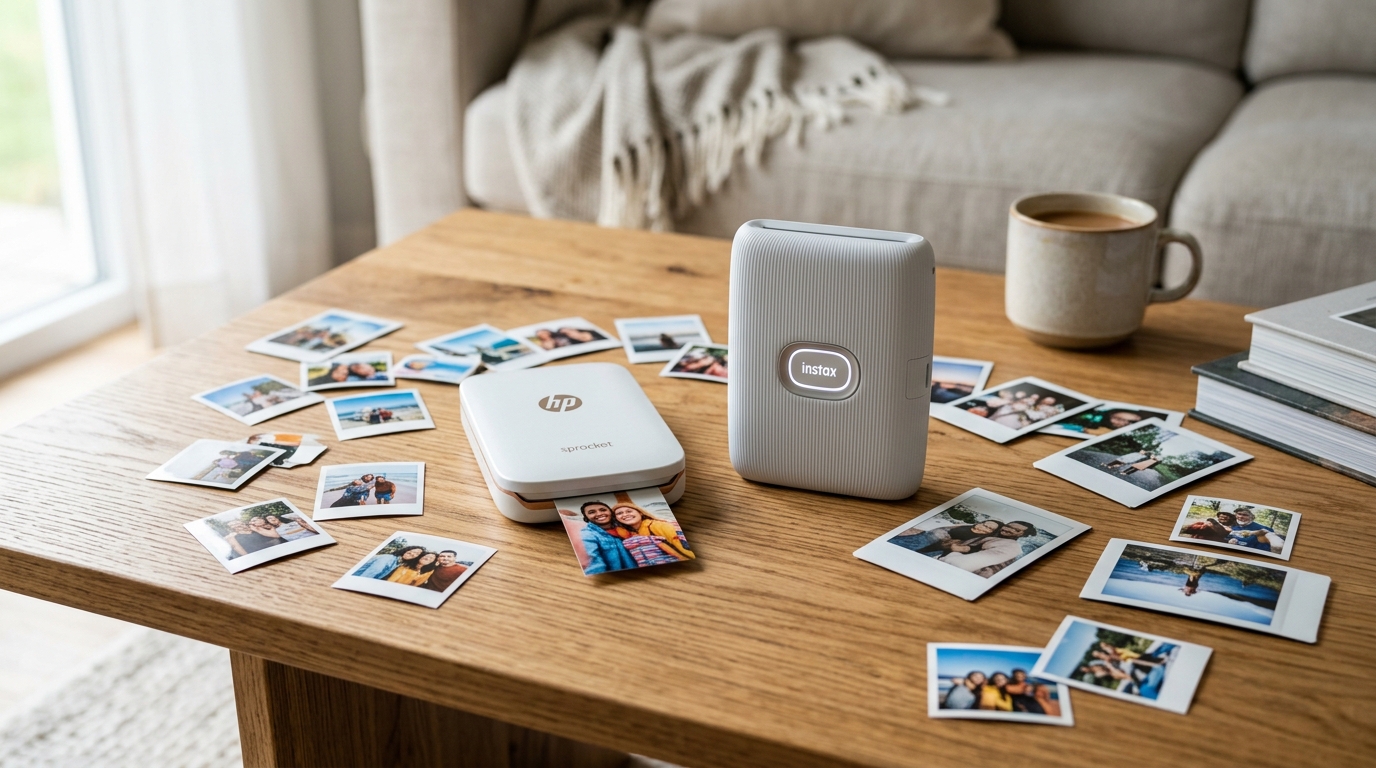
Portable photo printers are having a massive resurgence, and for good reason. People want physical copies of their smartphone snapshots without dealing with full-sized inkjet hardware.
Expensive ink cartridges that dry out, or complex networking issues. The two heavyweights dominating this space right now are the HP Sprocket and the Fujifilm Instax Mini Link 2.
Both deliver pocket-sized prints from your phone via Bluetooth. They use fundamentally different printing technologies that drastically alter the look, feel, and cost of your photos.
When we tested both side by side in our lab, the differences became glaringly obvious immediately. We ran through multiple packs of film for each device.
Pushed the companion apps to their limits with heavy editing, and drained the batteries from full to zero just to see real-world longevity. We scrutinized everything from the Bluetooth connection stability to the durability of the prints under stress testing.
If you are trying to decide which one deserves your money. You need to understand exactly how ZINK (Zero Ink) paper compares to real instant film chemistry.
It is not just about the hardware; it is an investment into an entire ecosystem of media.
Why This Comparison Matters
Choosing between the HP Sprocket and the Instax Mini Link 2 isn't just about picking a hardware brand; it is about committing to a specific media ecosystem. The initial purchase price of the printer is only a small fraction of what you will spend over the lifespan of the device.
Film costs add up fast, and depending on your shooting habits. You could end up spending hundreds of dollars a year on paper alone.
Furthermore, the physical prints themselves serve entirely different purposes. Are you looking to create a perfectly color-matched, sticker-backed grid in a travel journal or planner?
Or do you want the nostalgic, slightly unpredictable aesthetic of a traditional Polaroid-style instant photo to hand out to friends at parties or hang on a string light in a bedroom? Knowing the technical limitations and sweet spots of both systems will save you from buying the wrong tool for your specific creative needs.
We have seen many consumers purchase a ZINK printer expecting the thick. Classic feel of instant film, only to be disappointed by the thin sticker paper.
Conversely, we have seen scrapbookers frustrated by the bulky borders of Instax film when trying to arrange collages.
Side-by-Side Technical Comparison
| Feature / Specification | HP Sprocket (ZINK) | Instax Mini Link 2 (Instant Film) |
|---|---|---|
| Print Technology | ZINK (Zero Ink) thermal heating | Chemical instant film development |
| Print Size | 2 x 3 inches (Full bleed edge-to-edge) | 2.1 x 3.4 inches (Image area is 1.8 x 2.4 in) |
| Estimated Cost Per Print | ~$0.50 USD | ~$0.75 - $1.00+ USD (depending on borders) |
| Paper Backing | Peel-and-stick (Sticker adhesive) | Standard glossy film card (no adhesive) |
| Print Speed (Time to image) | ~40 seconds (exits fully dry and ready) | ~15 seconds to eject, ~90 seconds to develop |
| Battery Life (Shots/Charge) | ~35 prints per charge | ~100 prints per charge |
| Color Accuracy | Decent, tends to lean warm/magenta | Stylized, high contrast, vintage aesthetic |
| Connectivity & Range | Bluetooth 5.0 (~30 ft range) | Bluetooth 4.2 (~30 ft range) |
| Durability of Prints | Water/tear resistant, susceptible to heat fading | Very durable, archival quality chemistry |
Deep Dive: Print Quality and Core Technology
ZINK vs Instant Chemistry: How They Work
The HP Sprocket utilizes ZINK technology, which stands for Zero Ink. The printer itself contains no ink cartridges, ribbons, or toner.
The magic is entirely in the paper. The paper contains microscopic dye crystals (cyan, yellow.
Magenta) that are completely clear until the printer's thermal head applies highly specific, precise heat signatures to activate them. The result is a completely dry, smudge-proof print the second it exits the machine.
When we evaluated the ZINK output in the lab. We found the colors on the Sprocket to be reasonably accurate for a portable thermal printer, though it definitely struggles with deep blacks and extreme highlights.
Shadow areas tend to look a bit muddy or crushed, lacking definition. Furthermore, there is a noticeable magenta or warm cast on skin tones under certain indoor lighting conditions.
It is not professional photo lab quality, but it is excellent for casual snaps and journal entries.
The Instax Mini Link 2 is an entirely different beast and relies on decades of analog photographic history. It essentially houses a tiny internal OLED screen that exposes actual photographic film.
The exposed film is then rolled out through metal rollers that burst a microscopic pod of liquid development chemicals located in the thick bottom border. You watch the image slowly appear over 90 seconds.
The colors are punchy, the contrast is high, and the blacks are impressively deep.
However, it is crucial to understand that it is not "accurate" in a clinical sense. It looks like a retro instant photo because it literally is one.
Highlights will blow out easily, shadows can lose detail, and colors take on a heavily stylized, vintage hue. But that aesthetic is exactly why most people buy it.
It adds character and emotion to digital photos that might otherwise feel flat and sterile on a smartphone screen.
Print Size, Formatting, and Paper Thickness
When you hold an HP Sprocket print, it measures exactly 2 by 3 inches. The image bleeds right to the very edge without any borders.
The entire back is a peel-away sticker. This makes it an incredible tool for bullet journaling, scrapbooking, or slapping onto a laptop case, water bottle, or notebook.
The paper is quite thin, similar to heavy flexible photo paper. Is necessary so it does not add bulk when layered in notebooks.
The Instax film is larger overall (2.1 by 3.4 inches), but it has that iconic thick white border at the bottom and thinner borders on the sides. The actual image area is only 1.8 by 2.4 inches, making the picture itself smaller than the Sprocket's output despite the larger physical card.
However, the Instax print is thick, rigid, and feels like a substantial physical object. It has a premium, tactile quality that the ZINK paper simply lacks.
You can prop an Instax photo up against a monitor. Pin it to a corkboard, or hand it to a friend, and it feels like a real keepsake.
The ZINK paper feels more disposable.
Hardware Design, App Usability, and Connectivity
The Companion Apps: Customization vs Simplicity
Both printers rely completely on their respective smartphone apps for operation. There is no way to print to them directly from a computer via USB. We tested both apps extensively on both iOS and Android platforms to evaluate stability and feature sets.
The HP Sprocket app is heavily focused on deep customization and social integration. You get a massive library of digital stickers, borders, text fonts, filters, and even AR (Augmented Reality) features.
You can link the app and pull images directly from Instagram. Facebook, and Google Photos within the interface, which is a massive time saver.
The photo editing tools for adjusting brightness, contrast, and saturation are fairly robust. However, during our intensive lab testing, we did experience a few minor Bluetooth connection drops during long printing sessions.
Requiring a quick reboot of the printer to re-establish pairing.
The Instax Mini Link app is much more streamlined, colorful, and playful. It features a "Simple Print" mode for quick jobs when you just want to get the photo out.
A "Fun Mode" for parties. Fun Mode includes a compatibility match test (taking a photo with a friend to see your percentage match).
The highly advertised "InstaxAir" feature. InstaxAir allows you to draw in the air with the printer itself (using the LED on the side) while recording a video on your phone.
Then prints a QR code on the photo linking to that video. It is a neat party trick, though we found the novelty wore off relatively quickly.
The core printing experience, however, is rock solid. The Bluetooth 4.2 connection was highly stable in our testing, and we rarely experienced dropouts.
Battery Life and Field Portability
Portability is a huge factor when considering these devices. Both are small enough to throw in a backpack or purse, but the HP Sprocket is noticeably slimmer and lighter. It feels roughly the size of a slightly thick smartphone and slips easily into a pocket.
Where the Instax Mini Link 2 completely destroys the Sprocket is battery life. During our continuous lab rundown tests, the Sprocket managed about 35 prints before the low battery warning forced us to plug it in.
The Instax Mini Link 2 churned out an incredibly impressive 100 prints on a single full charge. If you are taking one of these to a wedding.
A long weekend festival, or a vacation, the Instax will easily survive the trip without needing a power bank. The Sprocket will almost certainly need to be recharged if you plan on printing heavily throughout the day.
Cost of Ownership: Film Availability and Long-Term Pricing
This is where the rubber meets the road for long-term ownership. Hardware prices fluctuate wildly during holiday sales, but both printers typically hover around the $99 to $129 USD mark. The initial investment is basically a wash.
The real cost is the media, and this is where the differences become stark. ZINK paper is widely available and significantly cheaper.
Because it is a generic technology licensed to multiple brands. You can easily find bulk packs that bring the cost down to roughly 50 cents per print.
Because it is a standardized format, you can technically use Canon Ivy or Polaroid ZINK paper in the HP Sprocket to hunt for deals. Though color calibration might be slightly off without using the proper blue barcode calibration card.
You have options to save money.
Instax Mini film, on the other hand, is a highly built-in chemical product manufactured solely by Fujifilm. It is universally available—you can find it in most pharmacies.
Big-box electronics stores, and camera shops around the world—but it is expensive. Depending on where you buy it and the quantity.
Expect to pay between 75 cents and over a full dollar per shot. If you decide to buy special bordered film (like black borders.
Pastel colors, or licensed character designs), the price jumps even higher. If you plan to print hundreds of photos a year for a journal or project.
The HP Sprocket will save you a substantial amount of money in the long run.
Pros and Cons Breakdown
HP Sprocket (ZINK)
Pros:
- ZINK paper is much cheaper per print, making high-volume printing affordable
- Prints are peel-and-stick, making it perfect for journaling and crafts
- Image goes right to the edge (full bleed) with no wasted space
- Hardware is slimmer, lighter, and more pocketable
- Robust app with excellent integration for social media platforms and cloud storage
Cons:
- Color accuracy can be muddy, especially in dark shadow areas
- Battery life is relatively poor, maxing out at roughly 35 shots
- Prints feel thin and lack the "premium" tactile feel of real film
- ZINK prints are susceptible to fading or discoloring if left in direct sunlight or extreme heat (like a hot car)
Instax Mini Link 2
Pros:
- Authentic, beautiful vintage instant film look with great contrast
- Prints are thick, rigid, and durable, feeling like a premium keepsake
- Incredible battery life, pushing close to 100 shots per charge
- Highly stable Bluetooth connection during operation
- Archival quality chemical prints resist fading much better over decades
Cons:
- Film is significantly more expensive per shot, raising the long-term cost
- Actual image area is smaller due to the classic thick white borders
- Hardware is bulkier and less pocketable than the Sprocket
- Images require patience, taking 90 seconds to fully develop after printing
The Verdict: Who Should Buy Which Printer?
After weeks of testing in our lab, carrying them in our bags. Printing hundreds of photos, our recommendation comes down entirely to how you plan to use the physical photos once they are printed.
Buy the HP Sprocket if you are a planner, scrapbooker, or high-volume printer. The peel-and-stick backing makes it the absolute ultimate tool for bullet journals, diaries, and school projects.
The significantly cheaper paper means you will not hesitate to print out dozens of memories from a weekend trip. It is highly practical, cost-effective, and the app allows for endless customization.
If you want volume and utility, the Sprocket is the clear winner.
Buy the Instax Mini Link 2 if you care deeply about the aesthetic, vibe, and physical feel of the photo. If you want pictures to hand out to friends at a party.
Pin to a corkboard, or string up on your wall with fairy lights, the Instax film is entirely unmatched. It feels like a real, tangible photograph, and the chemical development process gives every single shot a unique.
Nostalgic character that modern ZINK technology simply cannot replicate. Yes, you will pay more per print, and the camera is a bit bulkier.
The end results are undeniably cooler and feel much more special.
Frequently Asked Questions
Do I need to buy ink cartridges or toner for either of these printers?
No. Neither printer uses liquid ink cartridges or toner.
Can I print photos from my dedicated digital camera or DSLR?
Yes, but you must do it indirectly. Both of these printers require their specific smartphone apps to operate.
Will these photos fade over time? Are they archival?
All printed photos eventually fade when exposed to light, but their durability differs significantly. Instax chemical prints are generally more archival and highly resistant to light fading if stored properly in an album.
Can I use other brands of ZINK paper in the HP Sprocket to save money?
Technically, yes. ZINK is a standardized format licensed to multiple companies.
Does the Instax Mini Link 2 connect to multiple phones simultaneously at a party?
No, it can only maintain an active Bluetooth connection with one single smartphone at a time. If someone else wants to print their photo.
