


"Unable to Clean" is a strange way to describe what's actually wrong,. It's exactly why Brother printer error 46 confuses so many owners.
Your printer isn't struggling to clean anything on the outside. It's telling you an internal counter has run out of room,.
Once you understand what that counter is tracking, the fix stops feeling like a mystery.
What Error 46 Actually Means
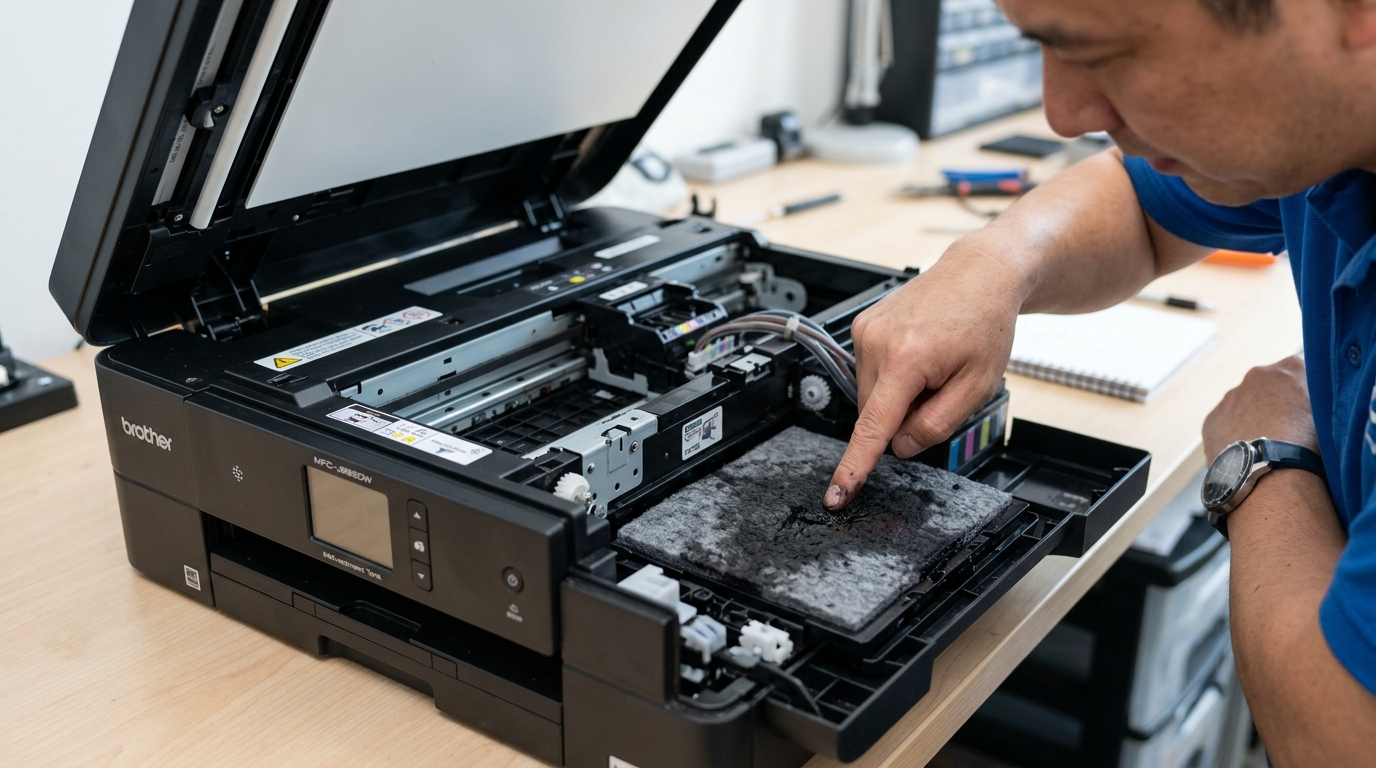
Every time your Brother inkjet runs a cleaning cycle — automatically or. You triggered one — it purges a small amount of ink through the print head and into an internal ink absorber pad, a sponge-like component that catches this waste ink so it doesn't leak inside the machine.
The printer counts every purge internally,. Once that count reaches its built-in limit (commonly cited around 6,400 cycles), it assumes the absorber pad is full and locks itself out of further cleaning to prevent an overflow.
That lockout is what you're seeing as error 46.
Why this matters: the pad might not actually be full. The printer is going by a counter.
Not a sensor reading actual saturation, so a printer that's run a lot of cleaning cycles over its life can hit this limit even if the pad has some capacity left. This is exactly why a counter reset, not a physical replacement, clears the error for a meaningful share of people.
Fix 1: Check the Real Internal Code First
The on-screen "Unable to Clean" message is a general external label — the actual internal. Fault code behind it can vary.maintenance mode to see the specific number: unplug the printer, hold down the Menu/Set button (or Start button on models without a Menu/Set key), plug the power back in while still holding the button,.
Keep holding until a maintenance message appears on the display.
Why this works: maintenance mode shows you Brother's internal diagnostic code directly, rather than the simplified message shown during normal operation. If you land on a genuine "Machine Error 46," you're dealing with the purge counter specifically,.
The reset below applies. A different internal code points somewhere else entirely, and you'd want to search that specific number instead.
Fix 2: Reset the Purge Counter
From maintenance mode. The reset sequence varies by model — machines with a numeric fax keypad typically use a specific key combination (often involving the Menu/Set key plus a short number sequence), while simpler button-only models use a different combination of Scan, Copy, or arrow keys pressed together.
Check your exact model's reset sequence before attempting this, since the wrong sequence in maintenance mode can affect other settings.
Why this works: this directly zeroes the internal counter the printer is using to decide the pad is full. Letting normal operation resume immediately without touching anything physical inside the machine.
For a printer where the pad genuinely still has capacity left. This is a complete, permanent fix — not a temporary workaround.
Fix 3: Know When You Genuinely Need the Pad Replaced
If you've reset the counter. Error 46 returns within a short stretch of normal use, or if you notice actual ink leaking inside the printer when you open it, the absorber pad may be genuinely saturated.
Replacing it means partially disassembling the printer to access. Swap the pad — a real repair job, not a settings change.
Why this matters: be honest with yourself about which situation you're in. A printer that's thrown this error once after years of light use is very likely a counter limit.
Not a soaked pad. A printer that's run heavy cleaning cycles constantly.
Or shows visible ink pooling, is more likely facing a genuine full pad.
When to Call a Professional
If a counter reset doesn't hold. Or you see actual ink inside the printer's housing, this becomes a physical repair rather than a maintenance-mode fix.
Weigh the cost of professional pad replacement against your printer's age. A new unit's price — on an older consumer inkjet, replacement often makes more financial sense than a teardown repair.
The Reality Behind "Unable to Clean 46" / "Ink Absorber Full"
Every time your Brother inkjet printer powers on or runs an automated printhead cleaning cycle. It pumps a small amount of liquid ink through the nozzles to flush out dried particles.Waste Ink Absorber Box).
To prevent ink from overflowing onto your desk, the printer's EEPROM maintains an internal mathematical counter.Error 46.
Step-by-Step Maintenance Mode Purge Counter Reset
- Enter Maintenance Mode:
- For Keypad Models: Press Menu > * > 2 > 8 > 6 > 4 in rapid succession.
- For Touchscreen Models: Press and hold the Home button for 5 seconds. Tap the blank fourth bar.
*2864. - The display will confirm
MAINTENANCE.
- Navigate to Function Code 80:
- Type
80on the keypad. A list of internal diagnostic logs will display. - Press the Up/Down Arrow (or press the
Mono Startbutton repeatedly) until you seePURGE: XXXXX(where XXXXX is a number like 08520).
- Type
- Reset the Purge Value to Zero:
- Type
2783on the numeric keypad.PURGE: 00000. - (Optional for Color Purge): Press
Mono Startto scroll toFLS-REC(Flushing Recovery Counter) and type2783to reset it to zero as well.
- Type
- Exit and Save:
- Press Stop/Exit to return to the main
MAINTENANCEprompt. - Type
99to reboot the printer. Error 46 will be completely cleared and full printing restored.
- Press Stop/Exit to return to the main
Important Physical Sponge Maintenance Advice
Resetting the electronic counter clears the software lock,. The physical felt pad inside your printer is still holding waste ink.
If this is the first time Error 46 has appeared. The sponge usually has enough reserve capacity to absorb ink for several more months.D00C5X001) or place a protective tray underneath the printer to prevent any potential ink leakage.
Frequently Asked Questions
Can I wash and reuse the Brother waste ink absorber pads?
Yes. You can wear rubber gloves, remove the felt pads, wash them thoroughly in warm running water until the water runs clear, squeeze them out, let them dry completely in the sun for 48 hours,.
Does Brother authorize users to reset Error 46?
Officially, Brother considers Error 46 a service-center repair event. However.
