


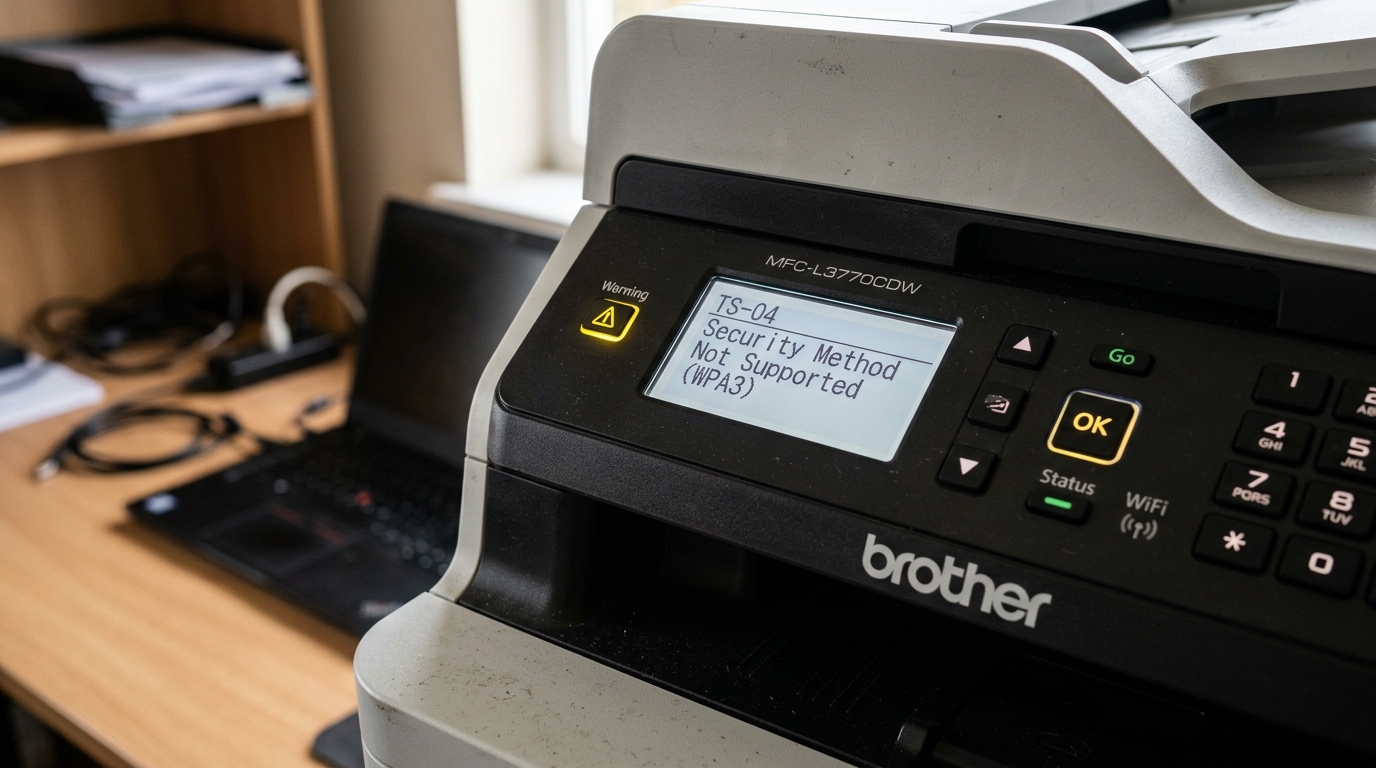
TS-04 is a genuinely different kind of failure than most Brother wireless errors: your printer actually found your network this time. The problem is what happens next — the security method your router is using and what your printer's wireless hardware can actually speak don't match.
What TS-04 Actually Means
TS-04 indicates the printer detected your network successfully but couldn't join it because the wireless security type doesn't match what the printer supports. This has become considerably more common as routers have modernized: many newer routers now default to WPA3 security, and a meaningful number of Brother printers, particularly older or budget models, only support WPA2 or earlier standards.
Why this matters: this isn't a printer malfunction or a password problem — it's a genuine compatibility gap between your router's current security setting and what your specific printer's wireless chip was built to handle.
Fix 1: Check Your Router's Current Security Mode
Log into your router's admin settings (usually through a browser at your router's IP address) and check what wireless security standard is currently active — look for WPA3, WPA2, or a mixed/transitional mode.
Why this works: confirming exactly what your router is currently running tells you whether a mismatch is genuinely the cause before you change anything, rather than guessing.
Fix 2: Switch to WPA2 or a Mixed Mode
If your router is set to WPA3-only, change it to WPA2, or to a mixed WPA2/WPA3 mode if your router offers that option, then attempt printer setup again.
Why this works: WPA2 remains widely supported across nearly all Wi-Fi hardware, including older printers, while a mixed mode lets modern devices use WPA3 and older devices fall back to WPA2 automatically — giving your Brother printer a security standard it can actually speak, without forcing every other device on your network to downgrade.
Fix 3: Check for a Firmware Update on the Printer
Before changing router settings, check whether a firmware update is available for your exact printer model through Brother's support site — some models have received updates adding WPA3 support after their initial release.
Why this works: if your specific printer has since gained WPA3 compatibility through firmware, this avoids needing to weaken your router's security setting at all, keeping WPA3 active for every device on your network.
When to Call a Professional
If switching your router to WPA2 or mixed mode doesn't resolve TS-04, or if you're not comfortable adjusting your router's security settings yourself, contact whoever manages your network, or Brother support to confirm definitively whether your exact printer model supports WPA3 at all, with or without a firmware update.
Understanding TS-04: WPA3/WPA2 Security Protocol & Cipher Mismatches
On Brother wireless diagnostics, TS-04 indicates a Security Protocol / Encryption Cipher Mismatch. The printer successfully discovered your router's SSID and attempted to initiate the security association, but the encryption parameters broadcast by the router (such as WPA3-Personal, TKIP, or Enterprise 802.1x) are not supported by your Brother model's network firmware.
Resolving TS-04 Security Protocol Conflicts
- The Modern WPA3 Incompatibility Fix:
Many Wi-Fi 6 and mesh routers (eero, Nest WiFi, Asus AX) default to WPA3-Personal (SAE) encryption. Brother wireless adapters manufactured prior to 2021 do not possess the hardware crypto-acceleration required for WPA3.
Log into your router admin console and change the 2.4GHz wireless security mode to WPA2-PSK (AES) or WPA2/WPA3 Mixed Mode.
- Avoid Deprecated WEP and WPA-TKIP Ciphers:
Older WEP and WPA-TKIP ciphers have been deprecated in modern firmware due to security flaws. If your router is configured for TKIP, the Brother printer will reject the handshake with TS-04. Always select AES encryption.
- Reset Network Parameters & Re-run Setup Wizard:
- On the Brother printer: Press Menu > Network > Network Reset. Confirm with 1 (Yes).
- After rebooting, select Menu > Network > WLAN > Setup Wizard.
- Select your network and re-enter your WPA2 password.
Brother Printer Stuck Flashing Wi-Fi Light After TS-04: How to Cancel Loop
When error TS-04 occurs, Brother printers often get locked in an infinite cryptographic retry loop, causing the Wi-Fi LED or Attention light to flash continuously.
Because TS-04 is a security protocol mismatch (typically your router demanding WPA3-Personal SAE while the printer only speaks WPA2-PSK AES), the printer's wireless card keeps broadcasting authentication beacons, getting rejected, and immediately re-attempting.
While stuck in this loop, the printer ignores local print jobs and may refuse to open configuration menus. Follow these steps to break the flashing retry cycle:
- Cancel the active wireless handshake: Press and hold the physical Wi-Fi button (or Go button on compact models) on the printer control panel for 3 to 5 seconds until the flashing light goes out or turns steady amber.
- Perform a Network Reset:
- On LCD menu models: Press Menu > Network > Network Reset. Press 1 (Yes) to confirm, then press 1 (Yes) to reboot.
- On touchscreen models: Tap Settings (Wrench/Screwdriver) > All Settings > Network > Network Reset. Press Yes for 2 seconds.
- On single-button models (e.g., HL-L2300D series): Turn off the printer, hold down the Go button, turn the printer on, keep holding until all LEDs light up, release Go, then press Go 6 times.
- Drain logic board capacitance: Disconnect the AC power cord from the printer while the unit is on. Leave it unplugged for 45 seconds to clear the active connection cache from temporary NVRAM.
- Adjust router security before reconnecting: Log into your router admin panel and set the 2.4GHz security mode to WPA2-PSK (AES) or WPA2/WPA3 Mixed before running the Setup Wizard again.
Frequently Asked Questions
Why is my Brother printer Wi-Fi light stuck flashing after a TS-04 error?
The printer is trapped in an infinite association retry loop with an incompatible WPA3 router. Hold the Wi-Fi button for 3 seconds to cancel the handshake, or perform a control panel Network Reset.
Does TS-04 mean I have the wrong password?
No. A wrong password produces code TS-07.
Will updating Brother firmware add WPA3 support?
Brother firmware updates add WPA3-SAE compatibility to select 2020+ models (such as HL-L2370DW and MFC-L2750DW). Run the Brother Firmware Update Tool from brother.com to check for available cryptographic patches.
Deep Protocol Analysis of Brother TS-04 Cipher Collisions
Code TS-04 is frequently triggered on corporate and educational Wi-Fi networks where 802.11w Protected Management Frames (PMF) are enforced as "Mandatory". Legacy Brother wireless chips cannot negotiate encrypted management beacons.
In your router or access point settings (UniFi, Cisco, Aruba), configure PMF from "Required" to "Optional / Supported" to allow the Brother printer to complete association.
Router Wireless Configuration Checklist for TS-04
- Band: 2.4 GHz only (802.11b/g/n)
- Channel Width: 20 MHz (Never 40 MHz or Dynamic Auto)
- Security Mode: WPA2-PSK (AES)
- Protected Management Frames (PMF): Optional / Disabled
