


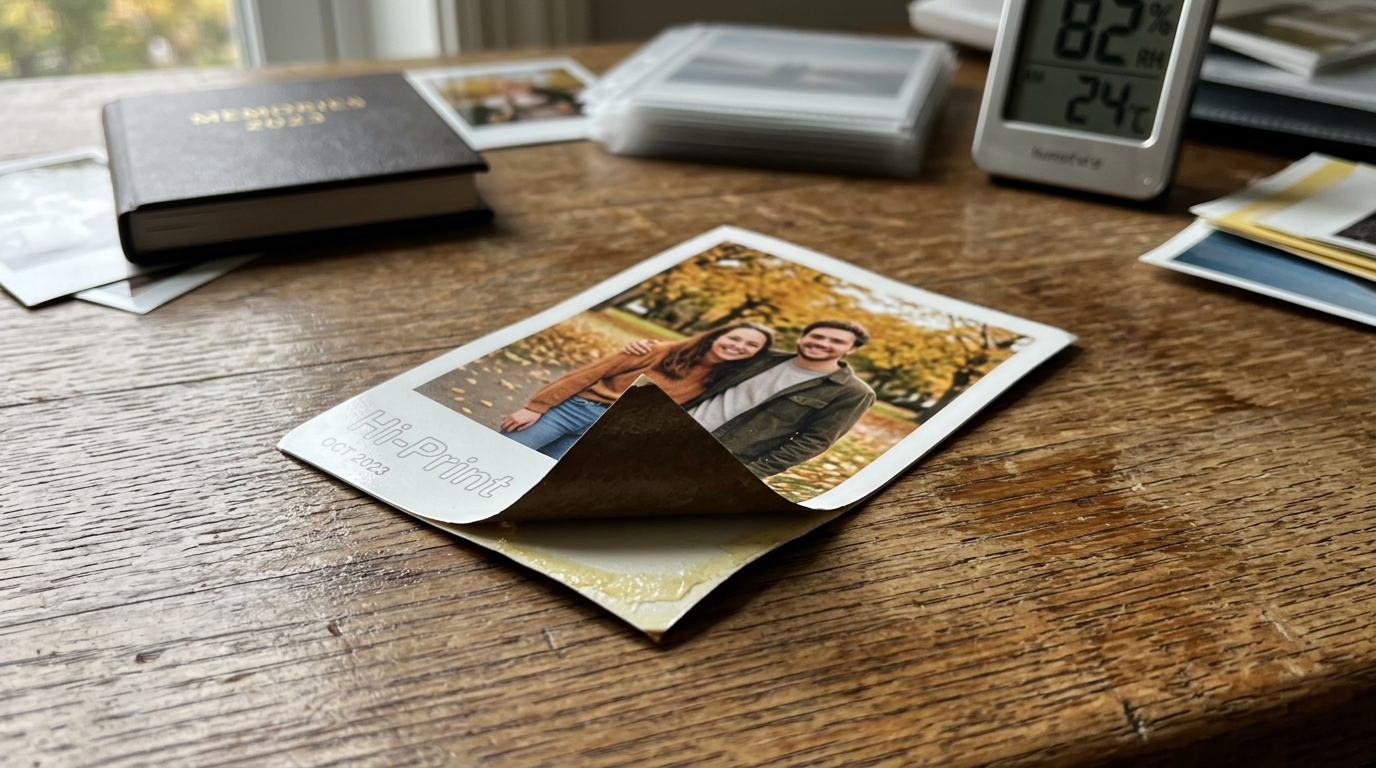
The Polaroid Hi-Print creates vibrant, high-quality 2x3 inch photos using advanced dye-sublimation technology. A major appeal of these prints is their adhesive backing, allowing users to peel off the protective layer.
Stick their memories into scrapbooks, on laptops, or phone cases. However, users frequently encounter issues where the sticker backing is incredibly difficult to peel, tears unevenly.
Loses its adhesive properties prematurely. Proper handling techniques and optimal storage conditions are paramount to preserving.
The integrity of both the printed image and the adhesive backing. This guide explores the mechanical and environmental factors affecting the Hi-Print paper.
Provides detailed solutions to ensure your stickers perform flawlessly.
Why This Happens
The difficulty in peeling the Polaroid Hi-Print sticker backing primarily. Stems from the intense heat applied during the dye-sublimation printing process.
Unlike ZINK (Zero Ink) paper which uses localized heat pulses to activate color crystals, dye-sublimation uses a thermal print head. Reaches very high temperatures to vaporize solid dyes from a ribbon onto the paper.
The paper must pass through the printer four times (Yellow, Magenta, Cyan, and a clear protective overcoat). This repeated exposure to high heat can cause the adhesive layer sandwiched between the photo paper.
The backing to slightly cure or bond too tightly to the. Release liner, making it stubborn to separate after the print cools down.
Environmental factors, specifically humidity and temperature, play a massive role in the behavior of the paper. Polaroid Hi-Print cartridges contain an all-in-one ribbon and paper roll.
If these cartridges are stored in hot, humid environments (like a car in summer. A damp basement), the moisture causes the paper base to.
Warp microscopically, while the heat accelerates the degradation of the adhesive. Conversely, extreme cold can make the adhesive brittle and the paper stiff, increasing the likelihood.
The backing will tear into layers rather than peeling off cleanly in one piece. The delicate balance of the release liner's silicone coating can be easily compromised by poor storage.
Mechanical technique also contributes to peeling failures. Many users attempt to peel the backing by picking at the extreme corners with their fingernails, bending the photo sharply.
Because the Hi-Print paper is thicker and more rigid than standard stickers due to the dye-sub receiver layers. The clear protective overcoat, bending the corner too aggressively can separate the photographic.
Layers from the paper base instead of separating the backing from the adhesive. Understanding the proper mechanical shear force required to initiate the peel is critical to preventing damage to the final print.
Step-by-Step Fix
- Allow the Print to Cool:Immediately after the photo is ejected from the printer, the paper. Adhesive are still warm from the thermal print head. Allow the print to sit flat at room temperature for at. Least 2 to 3 minutes before attempting to peel the backing. This allows the adhesive to stabilize.
- Utilize the "Flex and Roll" Technique: Instead of picking at the corner with a fingernail, hold the photo face down. Gently flex one of the corners downward (towards the photo side). Roll your thumb across the very edge of the backing. This slight curvature forces the stiffer backing paper to pop away from the flexible adhesive layer.
- Use a Craft Knife or Tweezers (If Stuck): If the backing refuses to lift, take a pair of precision craft tweezers or a dull craft knife. Very carefully slide the tip between the paper backing and the adhesive layer at a 45-degree angle. Once a small lip is created, use your fingers to pull the rest.
- Peel Diagonally and Slowly:Once you have started the peel, pull the backing diagonally across the photo, keeping. The angle of the pull close to the photo surface (a sharp 180-degree pull). Pulling slowly and steadily prevents the backing paper from delaminating and tearing into messy strips.
- Store Cartridges in a Cool, Dry Place: When not in use, keep your un-opened Polaroid Hi-Print paper cartridges in their original sealed foil packaging. Store them in a climate-controlled environment, ideally between 60°F. 75°F (15°C - 24°C) with relative humidity between 40% and 60%.
- Avoid Direct Sunlight and Heat Sources: Never leave cartridges or printed photos on a windowsill, near a radiator, or inside a hot vehicle. Prolonged exposure to UV light and heat will bake the adhesive onto the liner, making it permanently impossible to peel.
- Keep the Printer Clean:Dust and debris on the printer's internal rollers can transfer. To the back of the paper during the multi-pass printing process. Use a soft, dry microfiber cloth to gently wipe the inside of. The printer compartment when changing cartridges to ensure a smooth print path.
- Do Not Pre-bend the Paper: Never try to "loosen up" the paper by bending or folding it before printing. This will cause paper jams inside the printer and permanently damage the dye-receiver layer on the front of the photo.
- Use Fresh Cartridges: Dye-sublimation ribbons and adhesives have a shelf life. If you are experiencing persistent peeling issues with a cartridge. Has been sitting in a drawer for two years, the adhesive has likely expired. Always use fresh cartridges for the best results.
- Apply to Clean Surfaces:Once the backing is successfully removed, ensure the surface you are sticking. The photo to is clean, dry, and free of oils or dust. Press firmly from the center outward to ensure the adhesive bonds securely without trapping air bubbles.
Advanced Troubleshooting
If you have implemented all mechanical peeling techniques. Are still experiencing torn backing paper, you must evaluate the environmental history of your consumables.
Cartridges that have suffered thermal shock (rapid changes from extreme cold to. High heat) often exhibit a failure of the release liner's silicone coating.
In industrial adhesive manufacturing, the release liner is coated with a. Microscopic layer of silicone to ensure the adhesive lets go easily.
Thermal shock causes this silicone layer to migrate. Break down, resulting in a permanent bond between the paper backing and the glue.
Unfortunately, there is no remedy for this chemical breakdown. The affected cartridge must be discarded if the sticker functionality is required.
For users who want to salvage prints where the backing has torn unevenly. Leaving fuzzy paper residue covering the adhesive, a minor solvent application can help.
Lightly dampening a cotton swab with a small amount of isopropyl alcohol. Dabbing it onto the stubborn paper residue can soften it enough to scrape away.
However, extreme caution must be exercised, as the alcohol can also dissolve the adhesive itself. Damage the edges of the dye-sublimation print if it seeps into the photo layers.
This technique should only be used as a last resort for vital prints.
Additionally, understand the mechanical limitations of the dye-sublimation output. The final clear overcoat applied during the fourth pass of the Hi-Print process makes the photo water-resistant.
Durable, but it also adds structural rigidity to the top layer. When you try to peel the backing, the tensile strength of.
The top layer is competing against the shear strength of the adhesive. If the photo is printed in a very cold room, the top layer becomes brittle, and the adhesive becomes stiff.
Warming the print slightly by holding it between your hands for 30 seconds can soften. The adhesive polymers just enough to lower the required peel force, resulting in a clean separation.
For professional archiving or long-term storage of unused prints, consider investing in a humidor. A sealed dry box with silica gel desiccants.
This ensures that the moisture content of the paper base remains consistent. Variations in moisture content are the primary cause of paper curling.
When the Hi-Print paper curls aggressively, it puts constant shear stress on the adhesive layer, accelerating the degradation process. Increasing the likelihood of peeling failures when the user finally decides to expose the adhesive.
FAQ
Why does the backing paper tear into thin, fuzzy layers when I try to peel it?
This is usually caused by peeling too quickly or picking at the corner incorrectly. It means the paper base of the release liner is tearing rather than the silicone layer releasing from the adhesive.
Can I put my cartridges in the refrigerator to make them last longer?
No, it is not recommended to store Hi-Print cartridges in a refrigerator. The condensation that forms when taking the cold cartridge out into room temperature air will.
Is the adhesive on the Polaroid Hi-Print permanent or removable?
The adhesive is generally considered semi-permanent. It will stick strongly to most smooth surfaces like glass, plastic, and paper.
My prints are coming out very curled. Is this normal?
A slight curve is normal due to the paper wrapping around the internal rollers. However, severe curling indicates that the paper has absorbed too much moisture from a humid environment.
Can I just use the prints as normal photos without peeling the back?
Absolutely. The sticker backing is entirely optional.
