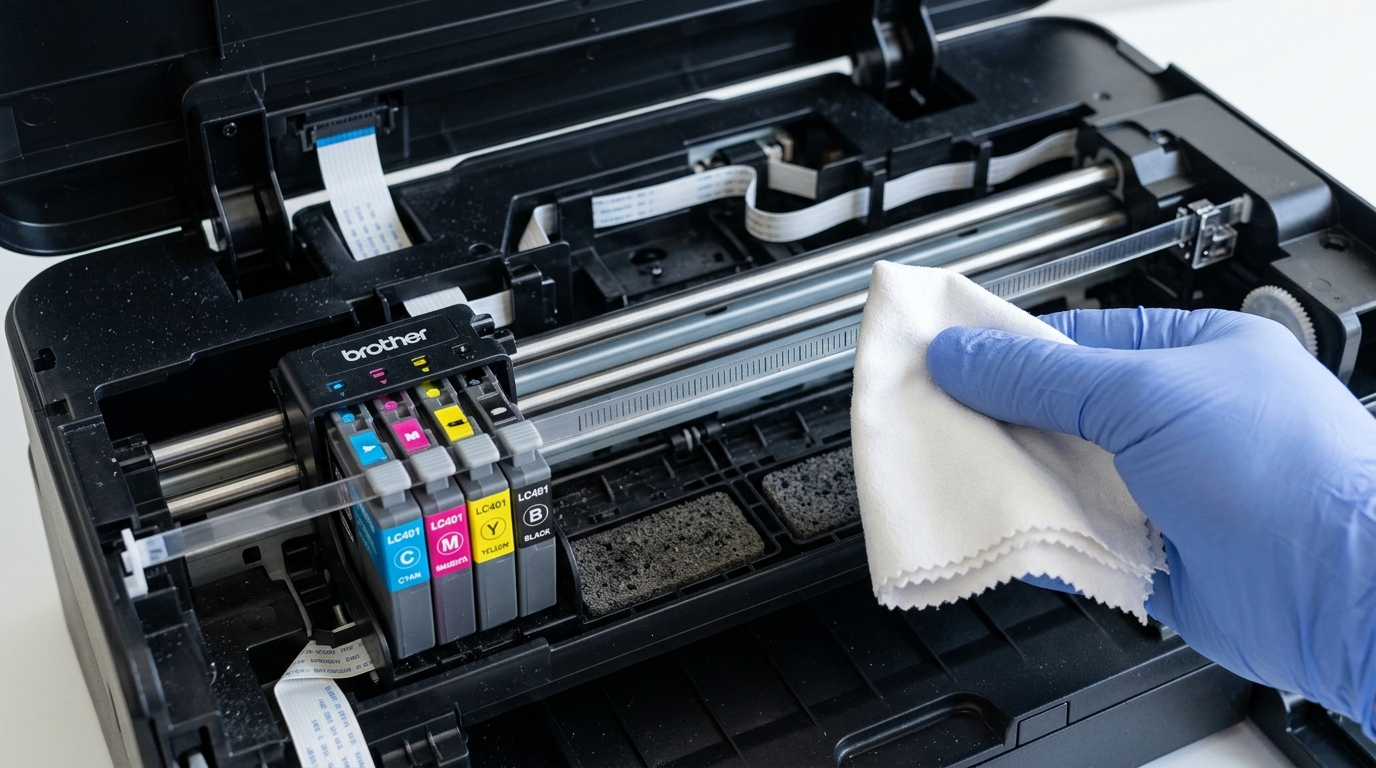
Error 48 sounds mechanical and serious, and the actual fix is genuinely a thirty-second wipe with a dry cloth. Brother printer error 48 points at one small, specific, easily-overlooked part inside the machine — and once you know where to find it, this stops being a mysterious error at all.
What Error 48 Actually Points To
Inside your printer, along the rail the print carriage travels back and forth on, sits a thin, clear plastic encoder strip — sitting just in front of a vinyl band inside the machine, marked with fine lines the printer reads to track exactly where the carriage is at any given moment. Error 48 fires when the printer can't reliably read that strip anymore, which usually means it's coated in dust, ink mist, or a light film built up over normal use rather than anything broken.
Why this matters: you're not troubleshooting a failed sensor or a dying motor. You're troubleshooting a dirty strip of plastic the printer depends on for positioning — and cleaning it directly resolves the vast majority of error 48 cases.
Fix 1: Locate and Clean the Encoder Strip
Turn the printer off and unplug it. Open the cover that gives access to the ink cartridges and carriage area.
Look along the carriage's rail for a thin, transparent plastic strip running parallel to it — it's easy to mistake for part of the frame at first glance. Using a dry, lint-free cloth, gently wipe along its full length, holding it lightly to avoid bending or creasing it.
Avoid liquid cleaners here; a dry wipe is what this specific part needs.
Why this works: the printer's carriage position sensor reads this strip optically, the same basic principle as any encoder strip in similar carriage-based devices. A film of dust or dried ink mist scatters that reading enough to trigger error 48, even though the strip itself and the sensor are both completely intact.
Removing the film restores an accurate read immediately.
Fix 2: Check for Anything Physically Blocking the Carriage
With the printer still off, gently try sliding the print carriage along its rail by hand. It should move smoothly with light, even resistance. If it catches or resists at any point, look closely for a scrap of paper, a stray label, or packaging debris caught in its path.
Why this works: a genuinely obstructed carriage can also disrupt normal encoder strip readings by preventing smooth, consistent movement past the sensor, producing symptoms that look identical to a dirty strip from the printer's perspective.
Fix 3: Power Cycle After Cleaning
Once the strip is clean and the carriage moves freely, power the printer back on and send a test print.
Why this works: this gives the printer's positioning system a fresh, accurate read of the now-clean strip from a clean startup, rather than continuing to reference whatever confused reading triggered the original error.
When to Call a Professional
If the encoder strip is clean, the carriage moves freely, and error 48 still appears after a power cycle, the carriage sensor itself or the strip's physical mounting may have a genuine fault. This is worth a service call rather than further home troubleshooting, since it points toward hardware beyond a cleaning fix.
The Critical Role of the Linear Optical Encoder Strip
In Brother inkjet and multifunction devices, the printhead carriage travels horizontally on a polished steel rail. To know its exact micro-millimeter position at any given microsecond, the carriage houses an optical transmissive sensor that reads a transparent plastic strip suspended directly behind it — the Linear Encoder Strip.
This strip features thousands of microscopic vertical hash marks. When grease, ink splatter, or dust obscures these marks, the sensor loses tracking, the carriage slams into the chassis side wall, and the logic board trips Error 48 (Printhead Carriage Positioning Fault).
Step-by-Step Cleaning and Re-alignment Protocol
- Power Down & Position the Carriage: Unplug the AC power cord. Open the scanner cover to reveal the printhead cavity. If the printhead is locked on the right side, plug the power in briefly, wait for the carriage to move to the center, and immediately yank the power cord to leave it free-floating.
- Locate the Encoder Strip: Look closely above the metal carriage guide rail. You will see a thin (about 5mm tall) semi-transparent plastic ribbon running the entire width of the printer.
- The Microfiber Wipe Technique:
- Take a lint-free optical microfiber cloth lightly moistened with distilled water.
- Gently pinch the strip between your thumb and index finger using the cloth.
- Gently slide your fingers along the length of the strip from left to right.
- WARNING: Never pull or stretch the strip aggressively. It is tensioned by a small, delicate spring on the left side. If the strip pops off its mounting hooks, re-threading it is very tricky.
- WARNING: Never use rubbing alcohol, acetone, or window cleaner on the encoder strip. Solvents dissolve the microscopic printed timing lines, permanently ruining the strip.
- Inspect the Carriage Optical Sensor: On the back of the printhead carriage is a small U-shaped plastic channel where the strip passes through. Blow clean compressed air into this channel to remove any dislodged paper fibers blocking the LED sensor eye.
- Verify Free Travel: Manually glide the carriage from extreme left to extreme right with your fingers. Ensure no cables or tubes snag.
Frequently Asked Questions
What happens if the encoder strip unhooks from the spring?
You can re-attach it using a pair of fine-tip tweezers. Hook the left end onto the metal tension spring first, thread the strip through the carriage sensor slit, and then latch the right end onto the fixed metal chassis post.
Can Error 48 be caused by a dried ink spittoon?
Yes. If the ink maintenance spittoon on the left or purge station on the right is piled high with congealed gelled ink, the printhead carriage physically crashes into the sludge before reaching its limit switch, triggering Error 48.