Introduction
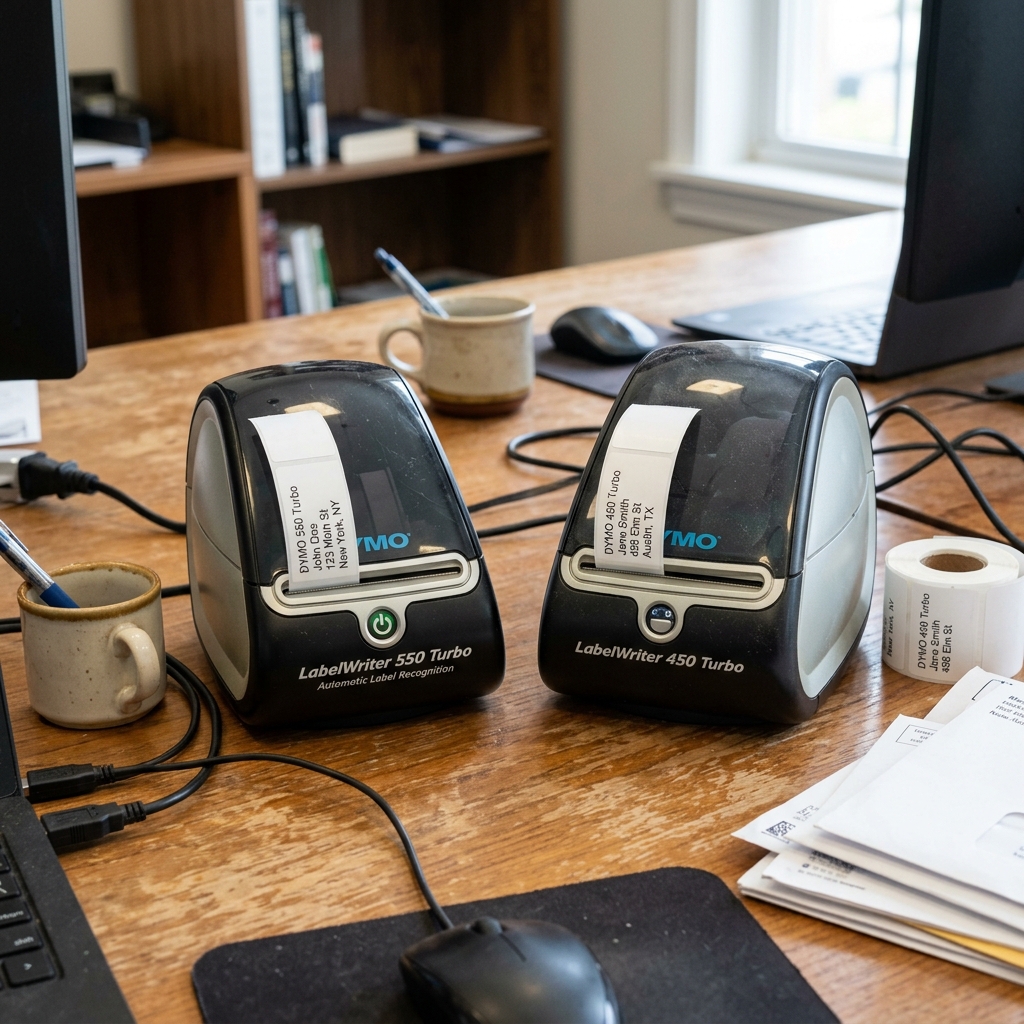
The decision to upgrade from the venerable DYMO LabelWriter 450 Turbo to the newer DYMO LabelWriter 550.. Turbo is a significant one for many businesses .
Individuals relying on daily label printing. For years, the 450 Turbo has been the gold standard for desktop thermal printing.
Prized for its speed. Reliability.
And most importantly, its compatibility with a vast ecosystem of third-party, low-cost generic labels. The introduction of the 550 Turbo brought modern features, faster printing, .
Network connectivity. . It also introduced a controversial technological shift: Automatic Label Recognition (ALR) powered by RFID technology.
This fundamental change alters the ongoing cost of ownership and the user experience. This comprehensive guide will break down every technical difference, weigh the pros .
Cons. . Help you determine whether upgrading to the 550 Turbo is a strategic move for your workflow or a potential pitfall that will unnecessarily inflate your operational costs.
Why This Happens: The Shift in Technology
The primary reason for the stark differences between the 450 ... 550 series lies in DYMO's shift towards a closed ecosystem.
The LabelWriter 450 Turbo operates purely mechanically . Optically.
It uses a light sensor to detect the gap or timing mark between labels. Allowing it to print on virtually any thermal label roll that physically fits on the spool.
The LabelWriter 550 Turbo, however, integrates an RFID reader inside the label spool compartment. Every authentic DYMO label roll designed for the 550 series now contains an RFID microchip embedded in the cardboard core.
When inserted, the printer reads this chip to automatically detect the label size, type. . Color.
And importantly, it counts exactly how many labels are remaining on the roll. This "Automatic Label Recognition" is marketed as a convenience feature—preventing printing..
Errors . Letting users know when they are running low.
However, this technology acts as a strict DRM (Digital Rights Management) system. The 550 Turbo will absolutely refuse to print on any label roll that lacks.
This specific. Built-in RFID chip.
Completely locking out all third-party generic labels.
Step-by-Step Fix: Evaluating the Upgrade Path
- Calculate Your Annual Label Consumption: Before upgrading, audit how many labels you use per month. If you print hundreds or thousands of labels using cheap third-party rolls.. Calculate the cost difference between those . Authentic DYMO branded labels. The cost increase can often exceed the price of a new printer within weeks.
- Assess Your Need for Speed:The 450 Turbo prints up to 71 labels per minute. While.. The 550 Turbo pushes this to 90 labels per minute. If you are doing large batch printing, this speed increase might be valuable. Time your current print jobs to see if a 20% speed boost justifies the upgrade.
- Evaluate Network Requirements:The 550 Turbo comes with a built-in Ethernet (LAN) port. Allowing it to be easily shared.. Across a network without needing a dedicated host PC or an external print server. The 450 Turbo is USB-only. If network sharing is critical, the 550 is a significant upgrade.
- Check Software Compatibility:The 550 Turbo requires the newer DYMO Connect software . Drops. Support for the older. Highly popular DYMO Label Software (v8). Ensure your operating system and any custom integrations (like third-party shipping software) are compatible with DYMO Connect before switching.
- Consider Inventory Management:The 550 Turbo's ability to tell you exactly how many labels remain on a roll via... The software is genuinely useful for high-volume environments where running out mid-batch is costly. Determine if this feature solves a real problem in your workflow.
- Test Third-Party Integrations: If you use stamps.com, Endicia, or specialized POS software, verify explicitly that they support the 550 Turbo. Many older systems are hardcoded to look for the 450 series drivers.
- Analyze Print Quality Needs: Both printers offer a resolution of 300x300 dpi. However, some users report that the 550 Turbo handles barcode edge sharpness slightly better due to an upgraded thermal head. Print a test barcode if this is critical for your scanners.
- Factor in Device Longevity: Your 450 Turbo might still have years of life left. Thermal printers are highly durable. Unless it is physically broken or you desperately need LAN connectivity, keeping the 450 might be the most economical choice.
- Understand the DRM Lock-In:Accept that if you buy the 550 Turbo. You are committing to.. Purchasing only authentic DYMO labels for the lifespan of the printer. There are currently no reliable hacks or bypasses for the RFID system.
- Explore Alternative Brands:If you need modern features but refuse the DRM lock-in. Use this evaluation period to look at alternatives like the Rollo. Zebra ZD421. Or Brother QL series, which still support third-party media.
Advanced Troubleshooting: Transitioning Systems
If you decide to make the upgrade, transitioning from the 450 to the 550 Turbo can present advanced software challenges. One common issue is driver conflict.
Having the DYMO Label Software v8 (used for the 450) . DYMO Connect (used for the 550) installed simultaneously on..
A Windows machine can cause the print spooler to crash or route jobs to the wrong virtual port. The advanced solution involves completely purging all DYMO software and drivers.
This requires not just uninstalling the programs, but opening the Print Management console (printmanagement.msc). Deleting all DYMO printers. .
Removing all DYMO drivers from the 'Drivers' tab to ensure no legacy DLL files conflict with the new installation. Furthermore, the 550's LAN functionality requires proper DHCP IP assignment.
In an enterprise environment, you may need to access your router to assign a static IP address to the 550.. Turbo's MAC address to ensure continuous connectivity across reboots.
Preventing the 'Printer Offline' error that plagues dynamic IP setups.
FAQ
Can I use generic labels in the DYMO 550 Turbo?
No. The DYMO 550 Turbo features an RFID reader that requires authentic DYMO labels with an embedded microchip.
Is the DYMO Label Software v8 compatible with the 550 Turbo?
No, the 550 series strictly requires the newer DYMO Connect software. The older v8 software will not recognize the 550 Turbo.
Does the 550 Turbo print faster than the 450 Turbo?
Yes. The 550 Turbo boasts print speeds of up to 90 labels per minute.
How does the 550 Turbo know how many labels are left?
The authentic DYMO label rolls have an RFID chip in the core. The printer reads this chip to identify the label type .
Does the DYMO 550 Turbo have Wi-Fi?
No, the 550 Turbo has a wired Ethernet (LAN) port for network connectivity. It does not have built-in Wi-Fi.