


Introduction
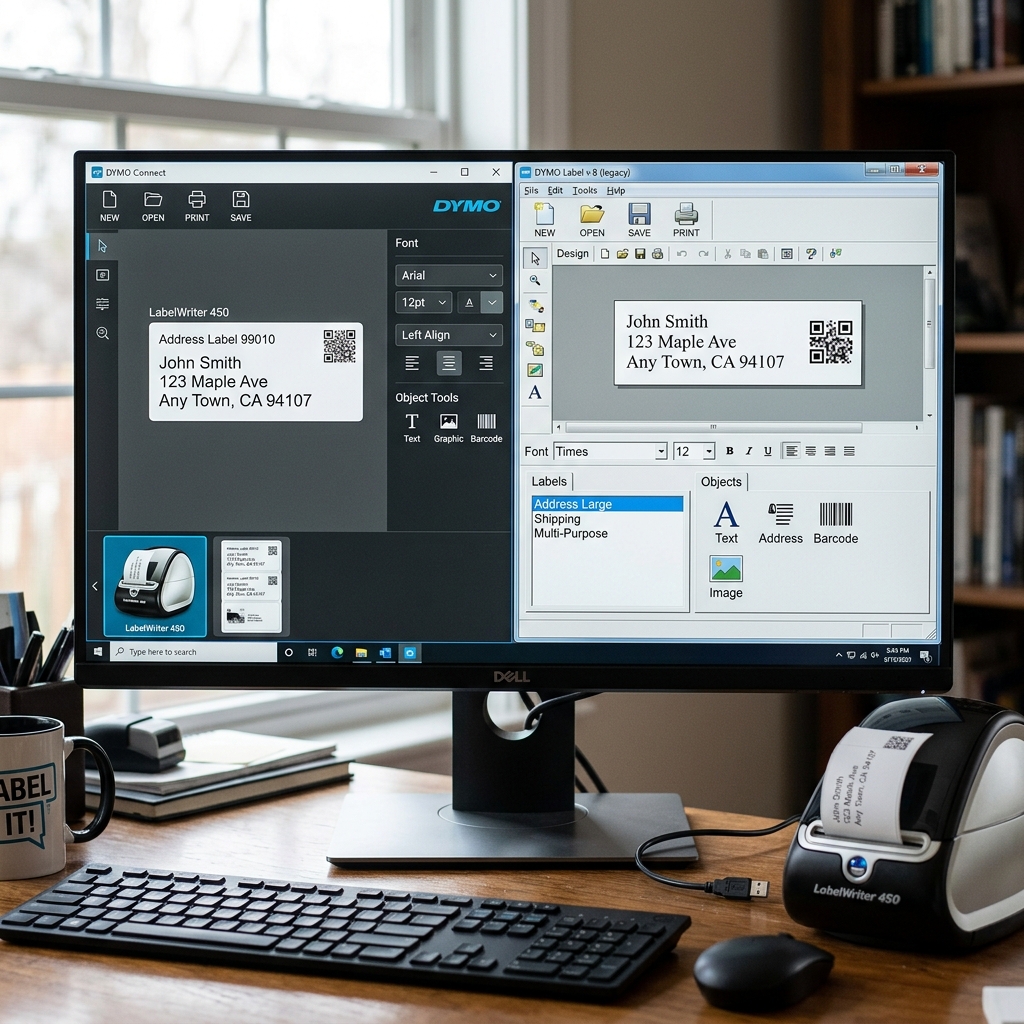
Navigating the software ecosystem for Dymo LabelWriter printers can be surprisingly confusing for both new users and seasoned veterans. For years, the gold standard for creating.
Printing labels was the venerable 'Dymo Label Software' (DLS), specifically version 8 (DLS v8). It was robust, feature-rich, and familiar to millions of office workers.
However, as operating systems modernized and user interface expectations evolved, Dymo introduced a completely rebuilt platform: 'Dymo Connect for Desktop'. Today, users frequently find themselves caught between these two applications, wondering which one they should use, why one might not work with their specific printer model,.
What the actual differences are in terms of features and compatibility. Choosing the wrong software can lead to frustrating driver conflicts, missing templates, and printers that refuse to communicate.
This comprehensive guide will deeply analyze the differences between Dymo Connect. Dymo Label Software, helping you understand their respective strengths, compatibility limitations, and guiding you to choose the correct application for your specific labeling needs.
Why This Happens
The existence of two distinct software platforms is the result of a necessary technological transition by the manufacturer, driven by changes in modern operating systems. Hardware updates.
1. The primary catalyst for Dymo Connect was Apple's release of macOS Catalina (and subsequent Windows updates),. Completely dropped support for 32-bit applications.
The older Dymo Label Software v8 was built on an aging 32-bit architecture. Rather than trying to patch the old code, Dymo opted to.
Build a brand new, modern, 64-bit application from the ground up—Dymo Connect. Consequently, Mac users on newer OS versions were forced to migrate, while Windows users had a longer grace period.
2. Dymo recently launched the LabelWriter 550, 5XL, and 550 Turbo series. These newer printers utilize "Automatic Label Recognition" via an RFID reader inside.
The printer that detects an authentic Dymo chip in the label roll core. This new hardware communication protocol is fundamentally incompatible with the old Dymo Label Software.
Therefore, if you purchase a new 500-series printer, you have no choice; you must use Dymo Connect.
3. Dymo Label Software v8, while functional, featured a dated user interface that looked straight out of the Windows XP era. Dymo Connect was designed to offer a more modern, intuitive, and touch-friendly interface, aligning with contemporary software design trends.
It aims to simplify the label creation process with modern drag-and-drop mechanics. Cleaner menus, though this shift frustrated power users accustomed to the granular control of DLS v8.
4. Because Dymo Connect was built from scratch, it initially lacked many of the advanced features found in DLS v8, such as complex database integrations, custom counter formatting,. Specific barcode symbologies.
While Dymo has slowly added features to Connect over time, some specialized workflows built in DLS. V8 still do not translate perfectly to Connect, causing friction for enterprise users trying to migrate.
Step-by-Step Fix
To resolve confusion and ensure you are using the correct software for your setup, follow this step-by-step evaluation process.
- Identify Your Printer Model:Look at the front or bottom label of your Dymo printer.
- If you have a LabelWriter 450, 4XL, 400, or older, you can technically use eithersoftware (depending on your OS).
- If you have a LabelWriter 550, 550 Turbo, or 5XL, you mustuse Dymo Connect. DLS v8 will not recognize these printers.
- Identify Your Operating System:
- macOS (Catalina 10.15 and newer): You must3 (which was a patched 64-bit version for Mac, though it is no longer officially supported and can be buggy). Dymo Connect is highly recommended.
- Windows 10 / 11:You have the freedom to choose either. However, Dymo is actively pushing users toward Connect, and DLS v8 is considered legacy and no longer receives security updates.
- Evaluate Your Workflow Requirements:
- Use Dymo Connect if:You need a simple, modern interface, you are doing basic address or barcode printing, you. Want easy integration with Google Contacts or Office 365, or you own a 500-series printer.
- Use Dymo Label Software (DLS v8) if:label files that don't import well into Connect.
- Perform a Clean Installation:Installing both programs on the same computer often causes driver conflicts and print spooler errors. Decide on one. Go to your OS Control Panel or Applications folder and completely uninstall any existing Dymo software. Restart your computer.
- Download the Correct Version:Go to the official Dymo website's support/downloads section. Download the latest version of either Dymo Connect or DLS v8 based on your decision in step 3. Install the software before plugging in the printer via USB.
- Import Old Templates (If Migrating):dymo' format. Open Dymo Connect, go to File > Import, and select your old templates. Review them carefully, as complex formatting sometimes shifts during the conversion.
Advanced Troubleshooting
If you encounter issues during the transition or while using either software, here are advanced solutions.
Resolving Driver Conflicts:If you previously had both installed and the printer won't respond, the print spooler is confused. Disconnect the printer.
Uninstall all Dymo software. Open the Windows Print Server Properties (search for it in the Start menu) or the Mac CUPS interface.
Delete any remaining Dymo drivers. Reboot, reinstall only Dymo Connect, and then plug the printer back in.
This forces the OS to associate the hardware with the correct, fresh driver.
Database Connection Failures in Connect:Dymo Connect handles databases differently than DLS v8. If your Excel import fails, ensure the Excel file is closed while trying to import. Connect requires exclusive access to read the file. xls format, as older formats can cause parsing errors.
Missing Add-ins for Word/Excel:DLS v8 was famous for its robust Microsoft Office add-ins (the little Dymo button in the Word ribbon). If you switch to Dymo Connect, you must reinstall the specific Dymo Connect add-ins during the installation process.
If they don't appear, open Word, go to Options > Add-ins, manage COM Add-ins,. Ensure the Dymo Connect add-in is checked and active.
FAQ
Can I install both Dymo Connect and Dymo Label Software on the same computer?
It is highly recommended against doing this. While technically possible on Windows, installing both creates significant driver conflicts because they fight for control over the USB port.
Will my old labels saved from DLS v8 work in the new Dymo Connect?
Yes, mostly. dymo format.
Why is Dymo Label Software (DLS v8) no longer available on the main download page?
Dymo considers DLS v8 to be legacy software. It is no longer in active development, receives no feature updates,.
I just bought a LabelWriter 5XL. Why won't Dymo Label Software v8 recognize it?
The entire LabelWriter 500 series (550, 550 Turbo, 5XL) uses a completely different internal architecture. Requires two-way connection to read the RFID chips in the new label rolls.
Which software is better for printing from a massive Excel database?
For sheer reliability and complex mapping, many power users still prefer DLS v8 (if using a compatible printer). However, Dymo Connect has vastly improved its database import features in recent versions.
