


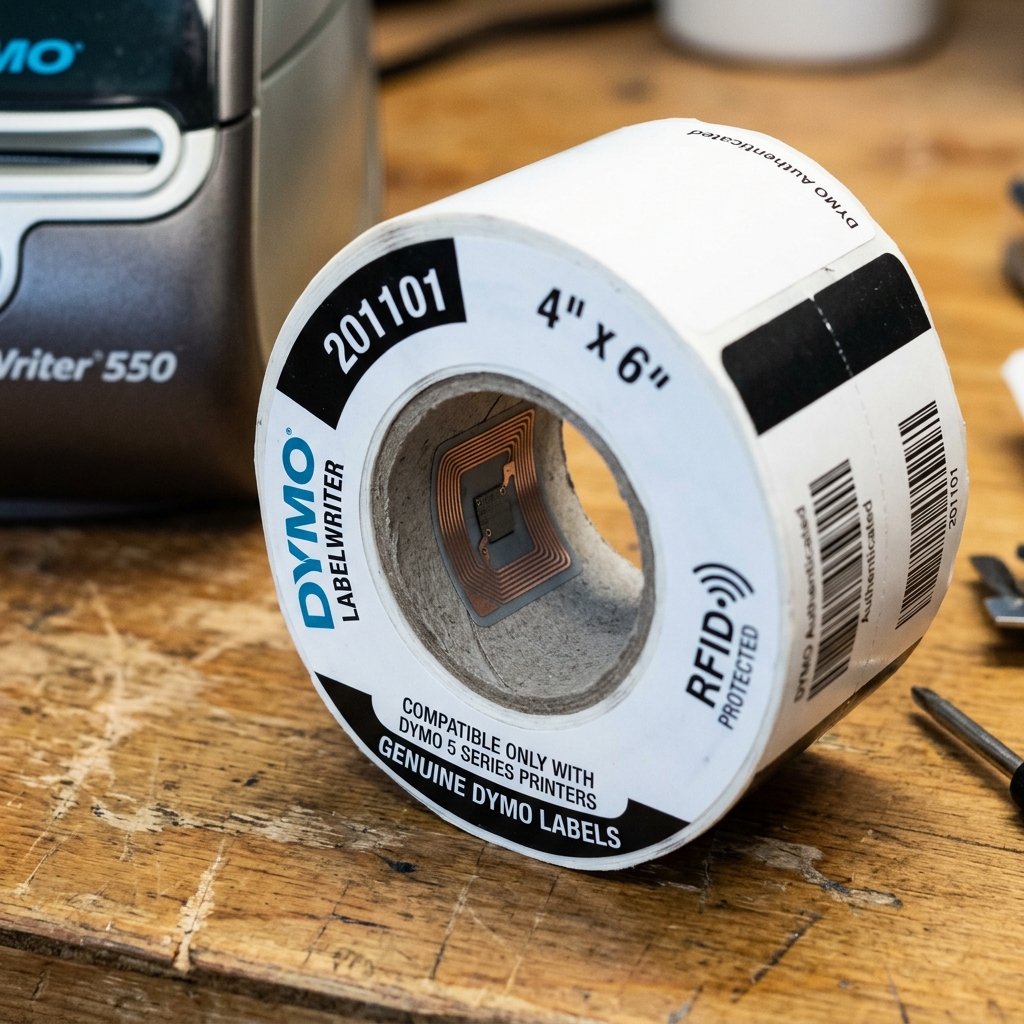
The Dymo LabelWriter 550 series represented a massive shift in how desktop label printers operate, introducing mandatory RFID DRM (Digital Rights Management) technology that effectively locked out third-party label manufacturers.For years, small businesses and high-volume shippers relied on the Dymo 450 series for its rugged reliability. And the ability to use cost-effective generic labels.
With the 550, Dymo embedded an RFID reader in the printer and placed a built-in RFID microchip inside the cardboard core of every official Dymo label roll. This chip communicates with the printer, authenticating the labels, tracking the remaining count, and identifying the label size automatically.
While Dymo markets this as a feature designed to prevent misprints and simplify the user experience, the reality for most users is a frustrating ecosystem lock-in that dramatically increases operational costs. When you attempt to load standard, non-chipped third-party labels into a Dymo 550, the printer immediately throws a "Labels Not Detected" or "Unrecognized Labels" error, refusing to print a single dot.In this exhaustive technical deep-dive, we will explore the inner workings of Dymo's RFID DRM system, why the printer behaves this way, the ongoing controversies surrounding this practice.
And the various methods—both software and hardware-based—that the community has developed to bypass or mitigate this restriction to restore compatibility with affordable third-party labels.
Why This Happens
The mechanism behind the Dymo 550's refusal to print on non-branded labels is rooted entirely in hardware-level cryptography and RFID communication. Inside the label compartment, located precisely where the label core rests on the spool, sits a small RFID transceiver antenna.
This antenna emits a low-power radio frequency field. Official Dymo labels feature a passive RFID tag embedded in the cardboard core.
When this tag enters the electromagnetic field, it powers up and transmits an encrypted payload back to the printer's mainboard. This payload contains vital information: a cryptographic signature proving the roll is a genuine Dymo product, the specific SKU/size of the labels (e.g., 30252 Address Labels), and a serialized counter representing the exact number of labels on the roll.
The printer's firmware (internal software) reads this data and decrements the internal counter on the chip every time a label is printed. This is the crucial part: the chip is read/write capable.Once the printer writes to the chip that zero labels remain, that specific RFID tag is permanently marked as empty.
And cannot be reused, even if you physically attach it to a new roll of generic labels. This prevents the simplest workaround of just taping an old official core to a new third-party roll.The error messages you see—such as blinking blue lights or software popups—are triggered.
Because the printer either detects no RFID response (when using generic labels) or reads an RFID tag that says the roll is empty or invalid. This DRM system is deeply integrated into both the printer's firmware (internal software).
And the Dymo Connect desktop software, making straightforward software patches difficult to implement.
Step-by-Step Fix
- The 'Chip Transplant' Method (Temporary Workaround): This is the most common DIY method, though it has limitations due to the label counter. First, you need an official Dymo label roll that still has a significant number of labels registered on its RFID chip. Carefully unspool the official labels without printing on them.
- Preparing the Spool: Take the cardboard core containing the active, non-empty RFID chip. Mount this core onto the right side of the Dymo spool holder (the side closest to the internal RFID reader).
- Loading the Third-Party Labels: Take your roll of generic third-party labels (they must be the exact same physical size as the official roll the chip came from).You must carefully wind the generic labels onto the official core. Or position the generic roll alongside the official core so the printer reads the good chip while feeding the generic paper.
- Understanding the Limitation: The printer will now print on the generic labels, but it will continue to count down the digital inventory on the official chip. Once that chip hits zero, the printer will lock up again, and you will need a fresh official chip. This method is essentially 'burning' official digital inventory to print on generic paper.
- Exploring Third-Party 'Clone' Chips (Advanced): Recently, some third-party manufacturers have successfully reverse-engineered the Dymo RFID protocol and are selling generic label rolls with cloned, functional RFID chips. Search for "Dymo 550 compatible labels with chip" from reputable industrial suppliers. Ensure you verify recent reviews, as Dymo occasionally releases firmware (internal software) updates to blacklist known cloned chip serial numbers.
Advanced Troubleshooting
For those looking for permanent solutions to the DRM lock, the options enter the realm of hardware modification and firmware (internal software) downgrades. Which carry significant risk of bricking the device.
Some electronics engineers in the maker community have documented methods to intercept the I2C or SPI communication between the RFID transceiver module and the main microcontroller. By placing a custom microcontroller (like a Raspberry Pi Pico or an ATtiny85) inline on these data traces, one can perform a "man-in-the-middle" attack.
The custom chip essentially lies to the printer's mainboard, constantly sending a valid encrypted response simulating a full roll of labels regardless of what is actually loaded in the spool. This requires advanced soldering skills and programming knowledge.
Another avenue involves preventing firmware (internal software) updates entirely. If you possess an early model Dymo 550 that hasn't been updated, do not install the latest versions of the Dymo Connect software, as it aggressively pushes firmware (internal software) updates to the printer via USB.
Some users configure their firewall to block all outbound traffic from the Dymo Connect application to prevent it from phoning home to verify chip signatures or download new blacklists.Ultimately, the most foolproof advanced solution for high-volume environments is often to sell the Dymo 550 and purchase a non-DRM thermal printer, such as a Rollo, Zebra. Or an older, refurbished Dymo 450 Turbo, which inherently lack the hardware to enforce these restrictions.
FAQ
Can I downgrade the firmware (internal software) on my Dymo 550 to remove the DRM?
Currently, there is no public, user-friendly method to downgrade the firmware (internal software) on a Dymo 550 to disable the RFID check. The DRM is a core hardware feature of the 550 series from launch, unlike some printers where it was added later.
Why did Dymo add this chip to the labels?
Dymo claims the RFID technology ensures the printer automatically knows the label size, preventing jams and misprints. And guarantees print quality by ensuring only certified paper is used.
Will taping an old core to a new roll work?
No, this common trick from older printers will not work on the 550. The printer counts every label printed and writes the remaining number back to the chip.
Are there any legal actions against this practice?
There has been significant pushback against Dymo's DRM practices, including class-action lawsuits accusing the company of monopolistic behavior. And deceptive trade practices by not making the DRM clearly known at the time of purchase.
