


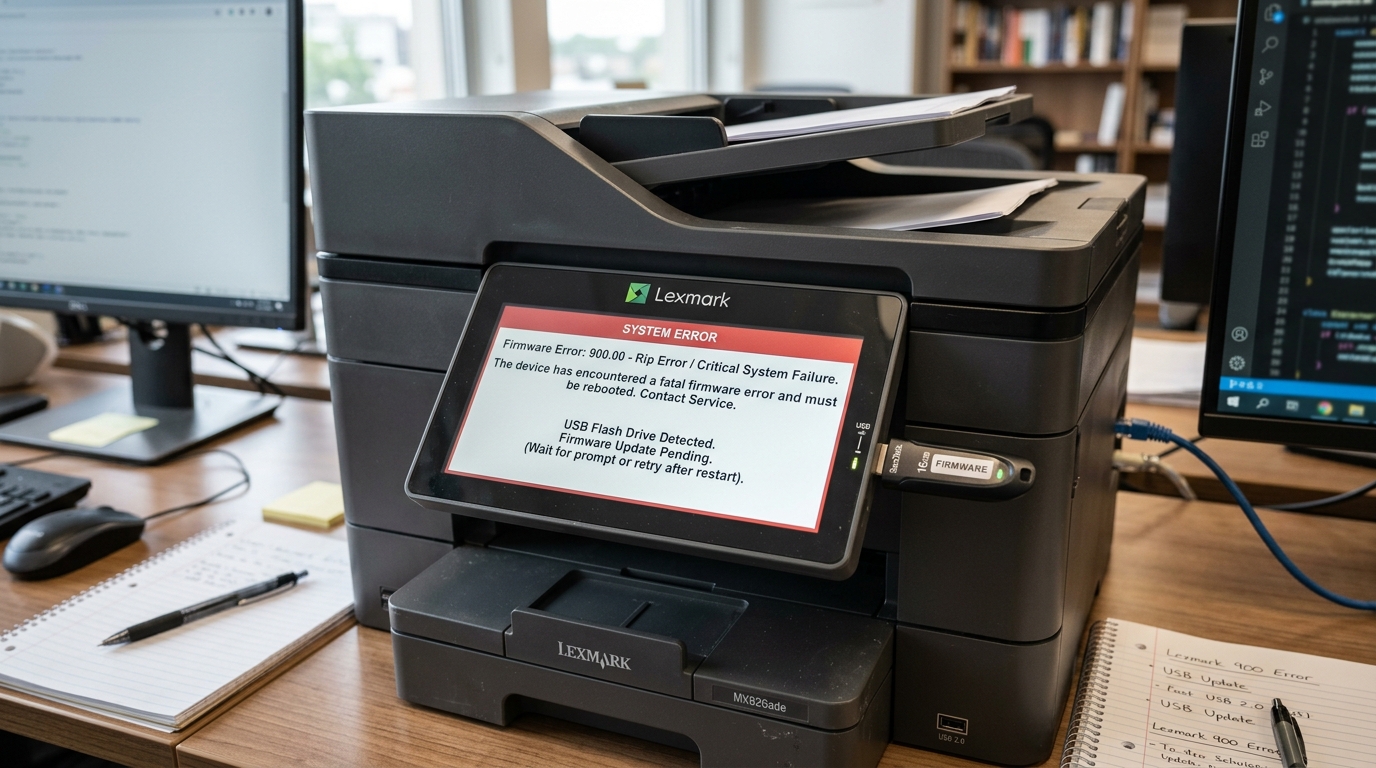
Deconstructing Lexmark Firmware Error 900 and the Importance of P128 Updates
The sudden appearance of a "Firmware Error 900" (often followed by a sub-code like 900.00 or 900.xx) on a Lexmark printer's display is a critical event that signifies a severe breakdown in the device's fundamental software operations. Unlike a simple paper jam or low toner warning, Error 900 indicates an unrecoverable software exception—a kernel panic within the printer's embedded operating system.
This error completely halts all printing, scanning,. and network communication functions, rendering the machine entirely unresponsive until a hard reboot is performed.
The root causes of Error 900 are multifaceted, ranging from handling corrupted print jobs containing malformed PostScript or PCL data. to memory leaks within the printer's network stack when dealing with complex enterprise network environments,.
and fundamentally, to running outdated or bug-laden base firmware (internal software).
Lexmark continually addresses these critical stability issues through rigorous software engineering, culminating in essential firmware (internal software) releases. frequently denoted with versions containing 'P128' or similar engineering build identifiers.
This exhaustive guide provides a deep technical analysis of the Error 900 phenomenon, offering precise. step-by-step methodologies to diagnose the triggering event.
clear the error state,. and successfully deploy the crucial P128 (or newer) firmware (internal software) updates required to permanently stabilize your Lexmark imaging infrastructure.
To effectively combat Error 900, one must understand that a modern Lexmark enterprise printer is essentially a specialized computer running a complex. often Linux-based, embedded operating system. It manages concurrent tasks: processing incoming network traffic. parsing complex page description languages, controlling high-voltage electromechanical components,. and managing user interface interactions.
Error 900 occurs when one of these software threads encounters an impossible condition—such as attempting to access a protected memory address. entering an infinite loop.
while parsing a corrupted font file within a PDF. or experiencing a buffer overflow during a high-speed network transfer.
When the operating system's watchdog timer detects this fatal lockup. it intentionally crashes the system, throwing the "900.xx System Error" to prevent unpredictable mechanical behavior or further data corruption.
Therefore, resolving the error is not merely about restarting the machine; it requires identifying. and eliminating the specific data payload that caused the crash. followed by updating the core firmware (internal software) to a version (like the highly stable P128 branch) where that specific software vulnerability has been patched by Lexmark's engineering team.
Why This Happens: The Anatomy of a System Crash and Corrupt Data
The manifestation of Error 900 is most frequently triggered by the printer attempting to process a 'poison pill'—a specific print job or network packet that exploits an unpatched vulnerability in the printer's firmware (internal software). A prevalent scenario involves the interpretation of complex PDF documents.
If a PDF contains malformed vector graphics, embedded fonts with broken hinting data. or utilizes features of the PDF specification that the printer's internal RIP (Raster Image Processor) engine cannot handle, the RIP engine may crash, instantly resulting in an Error 900.
This is why the error often appears consistently when a specific user attempts to print a specific document,. while other documents print flawlessly.
Another significant vector is network communication. In complex enterprise networks, printers are bombarded with broadcast traffic, SNMP polling from management servers,. and various discovery protocols (Bonjour, WS-Discovery).
A flaw in the printer's network stack firmware (internal software) might cause a memory leak when handling a massive influx of specific SNMP queries. Over time, the printer's RAM is exhausted, leading to a system crash. and the dreaded 900 error.
Hardware degradation can also masquerade as a software Error 900. The printer's firmware (internal software). and operating system reside on internal flash memory (NVRAM or a small internal eMMC drive).
If sectors on this flash storage begin to fail due to age or thermal stress, the operating system may attempt to read corrupted executable code. leading to an immediate kernel panic. Similarly, faulty RAM modules (if installed) can flip bits during data processing. turning a legitimate print command into an illegal instruction that crashes the processor.
Furthermore, incomplete or interrupted firmware (internal software) updates are a major cause of persistent 900 errors. If a printer loses power or network connectivity. while flashing a new firmware (internal software) image. the resulting corrupted firmware (internal software) will inevitably crash upon boot or during specific operations.
This is why Lexmark releases updates like the P128 build; these releases are often focused entirely on stability, rewriting memory management routines. updating network protocol stacks to handle anomalous traffic gracefully,. and strengthening the RIP engine's error-handling capabilities to reject malformed print jobs rather than crashing.
Step-by-Step Fix: Diagnostics, Clearing, and Firmware Flashing
Resolving an Error 900 requires a triage approach: isolating the cause. clearing the immediate fault, and permanently fixing the underlying vulnerability via a firmware (internal software) update.
- Isolate and Hard Reset: Immediately turn off the printer using the physical power switch. Disconnect the network cable (Ethernet). and any USB cables. This is crucial to prevent the printer from immediately receiving the corrupt print job that caused the crash upon reboot. Leave the printer unplugged from the wall outlet for at least 60 seconds to allow all capacitors to discharge, clearing volatile RAM.
- Clear Print Queues (The Crucial Step): Keep the printer disconnected. You must clear the print queues on all computers and print servers. These are the devices that send jobs to this printer. A bad document in the queue will crash the printer again when you reconnect. Go to 'Printers & Scanners' on Windows or 'Printers' in macOS. Forcefully cancel all pending documents for the Lexmark printer.
- Perform a Standalone Boot Test: Plug the power cord back in and turn on the printer (keeping network/USB disconnected). Allow the printer to boot completely to the "Ready" state. If the printer boots successfully to "Ready" and you can navigate the menus without a 900 error, the hardware is likely fine,. and the issue was definitely caused by external data (network traffic or a print job). If the printer throws an Error 900. while disconnected, you have a severe hardware failure (bad NVRAM/logic board) requiring professional repair.
- Obtain the P128 (or Latest) Firmware: Go to the official Lexmark Support website. Enter your exact printer model number. Navigate to the 'Drivers & Downloads' section. and select 'Firmware'. Download the latest firmware (internal software) package (often a .fls file). Look for release notes confirming stability fixes or mentioning the P128 build lineage. Save this file to a computer that will be used to update the printer.
- Flash Firmware via Embedded Web Server (EWS): Reconnect the network cable to the printer. Obtain the printer's IP address from its control panel. Open a web browser on your computer. and type the IP address to access the printer's EWS. Navigate to Settings > Update Firmware (or Device > Update Firmware). Browse to the downloaded .fls file and initiate the update. Critical: Do not interrupt power or network connectivity during this process. This can take up to 15 minutes.
- Verify and Factory Reset (Optional but Recommended): Once the update is complete and the printer reboots, verify the new firmware (internal software) version on the settings page. If you were experiencing chronic 900 errors due to network stack corruption. it is highly recommended to perform a factory network reset (via the Settings > Network/Ports menu) to clear any legacy, problematic settings data. and start fresh with the new, stable firmware (internal software) architecture.
Advanced Troubleshooting: Invalid Engine Code and Bootloader Recovery
In severe cases where an Error 900 is caused by a completely botched firmware (internal software) update, the printer may be locked in a boot loop, displaying the error before the network stack even initializes. rendering the EWS (Embedded Web Server) inaccessible. In this scenario, you must utilize Lexmark's low-level recovery mechanisms.
The printer must be booted into "Invalid Engine Code" mode. This is typically achieved by holding down a specific combination of buttons on the control panel (e.g., 3 and 6, or 2 and 6) while powering on the machine.
This bypasses the corrupted main operating system. and loads a minimal, fail-safe bootloader designed solely for receiving a new firmware (internal software) flash. Once in this mode, the printer usually defaults to a specific IP address via DHCP or requires a direct USB connection.
If connecting via USB in recovery mode. you must use a specialized command-line utility provided by Lexmark (often part of their enterprise administrative tools) to push the .fls firmware (internal software) file directly over the USB port. The command typically resembles copy /b firmware (internal software).fls USB001 on a Windows command prompt.
This forces the bootloader to accept the new firmware (internal software) block by block, overwriting the corrupted NVRAM sectors. This process is inherently risky; if the USB connection drops during this low-level flash. the logic board may be irreparably 'bricked', requiring a physical motherboard replacement.
For complex network environments, a recurring Error 900 after a firmware (internal software) update points to a fundamental incompatibility between the printer's network stack and specific network security appliances. For instance, deep packet inspection (DPI) firewalls or aggressive intrusion detection systems (IDS) may intercept and modify the printer's SNMP traffic or SIP protocols, confusing the printer's firmware (internal software).
and causing a memory leak that leads to a crash.
To isolate this, move the printer to an isolated VLAN (Virtual Local Area Network) with no security appliances inline. If the printer remains stable on the isolated VLAN.
but crashes on the production network, you must work with your network administrators to whitelist the printer's IP address or disable specific DPI inspections for the printer's traffic, as the issue is environmental, not intrinsic to the printer hardware or firmware (internal software).
Finally, always scrutinize the application generating the print jobs. Legacy enterprise Resource Planning (ERP) systems, AS/400 mainframes. or customized SAP environments often output raw PCL or PostScript code that deviates from strict modern standards.
The new P128 firmware (internal software) may be less tolerant of these specific deviations than older firmware (internal software) versions. If the Error 900 only occurs when printing from a specific ERP module.
the solution may not be on the printer side,. but rather requires updating the printer driver within the ERP system or modifying the print output stream formatting to adhere strictly to the PCL6 or PS3 language specifications.
Frequently Asked Questions (FAQ)
Will updating to the P128 firmware (internal software) erase my saved network settings and address book?
Generally. no.
The Error 900 only happens when Susan tries to print a specific Excel spreadsheet. Why?
This is the classic 'poison pill' scenario. Susan's Excel spreadsheet likely contains a highly complex chart, an embedded object, or a specific TrueType font that is corrupted or formatted in a way that the printer's internal Raster Image Processor (RIP) cannot parse.
I downloaded the firmware (internal software), but the file is a .zip. What do I do?
zip file before uploading it to the printer. The printer's EWS only accepts the actual firmware (internal software) payload file.
My printer screen is completely black, and the lights are flashing after an Error 900. Is it dead?
Not necessarily. A black screen with flashing lights often indicates the printer is stuck in a boot loop or has entered an unrecoverable hardware fault state.
