


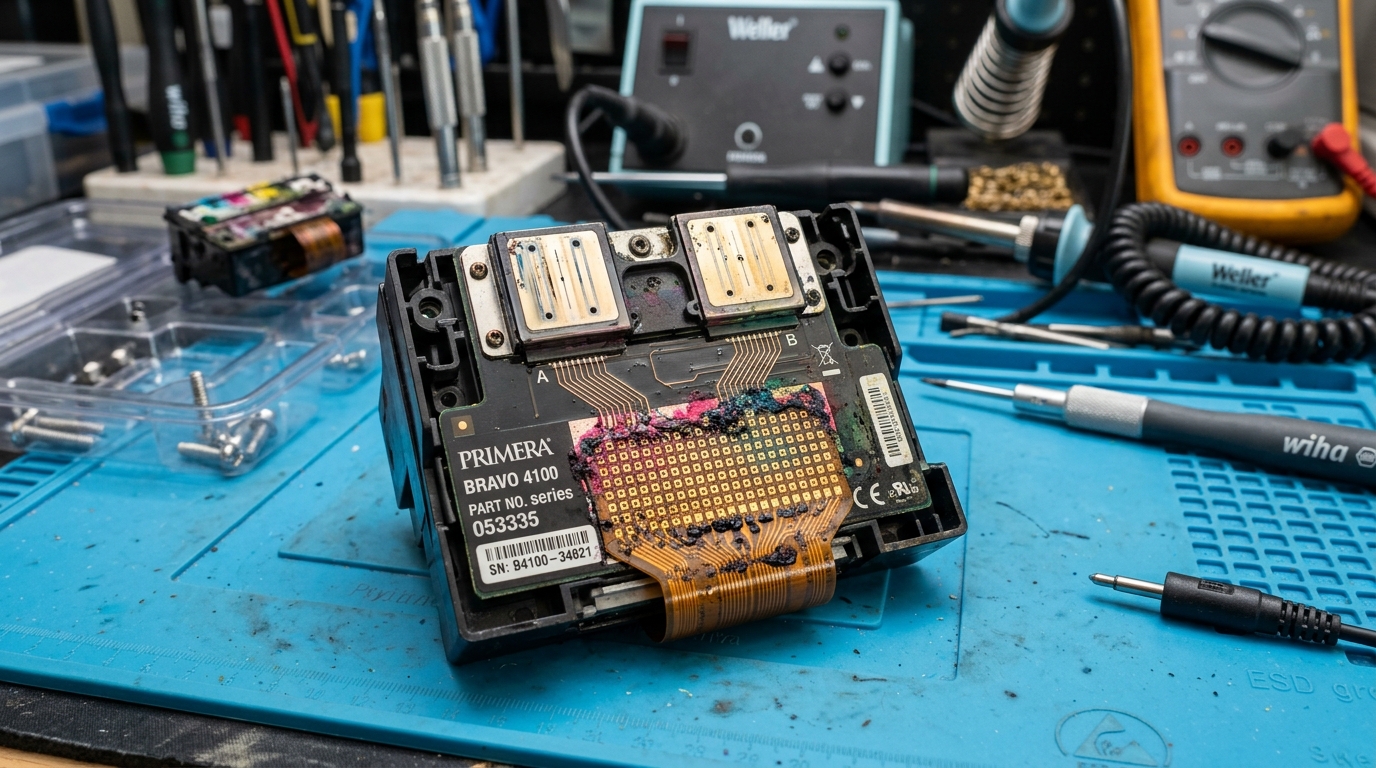
Diagnosing 'Printhead Defective' on the Bravo 4100
Unlike older Bravo SE models that use a combined tri-color cartridge (where the printhead is built into the ink tank), the Bravo 4100 and 4200 series utilize a separate, semi-permanent printhead plate and four individual CMYK ink tanks. This saves money on ink, but introduces a new point of failure.
Fix 1: Cleaning the Electrical Contacts
The printer communicates with the printhead via an array of flat copper pads on the back of the printhead, which press against spring-loaded gold pogo pins in the carriage. This is the #1 cause of defective errors.
- Open the printer cover and wait for the carriage to move to the center.
- Remove the four ink tanks and set them aside.
- Flip up the grey latch and lift out the black printhead chassis.
- Look at the rear copper pads. If you see blue or magenta ink smeared across them, the circuit is shorting out.
- Gently wipe the pads with 99trong>99% Isopropyl Alcohol. Do the same for the gold pins inside the carriage.
- Allow to dry completely, reinstall, and reboot the printer.
Fix 2: Replacing the Bravo 4100 Printhead
If cleaning the contacts does not resolve the error, or if you run a nozzle check and entire colors are permanently missing despite multiple deep-cleaning flushes, the thermal resistors inside the printhead have burned out. The printhead has reached the end of its consumable lifespan.
Installation Steps:
- Purchase a genuine Primera 53471 Printhead.
- Install the new printhead and lock the grey latch.
- Install fresh ink cartridges.
- Open the PTStatus software and run the Align Printhead utility immediately. Failing to align a new printhead will result in blurry text and misaligned graphics on your CDs.
Understanding Primera Bravo 4100 Series Printhead & Cartridge Systems
The Primera Bravo 4100, 4101, 4102, and 4200 series disc publishers utilize a multi-cartridge system (Cyan, Magenta, Yellow, Black) mated to a separate, high-resolution user-replaceable thermal printhead assembly. When the PTStatus monitor alerts with "Printhead Defective", "Missing Cartridge", or error code 4100-PH, the communication bus between the carriage board and the printhead's cryptographic microchip has failed.
Exhaustive Diagnostic & Printhead Replacement Protocol
- Clean the Copper Contact Array with 99% Isopropyl Alcohol:
Power off the Bravo unit. Open the top cover.
Lift the blue printhead latch and pull the printhead out of the carriage. Clean the gold rectangular contact pads on the back of the printhead and the gold spring pins inside the carriage with a lint-free swab dipped in 99% anhydrous isopropyl alcohol.
Let dry for 5 minutes.
- Verify Individual Ink Tank Microchip Seating:
Each of the four ink tanks contains an RFID/smart chip on its underside. Remove all cartridges, inspect the chip contacts for ink mist, and firmly click each cartridge back into its color-coded slot until the plastic clip locks.
- PTStatus Printhead Life & Resistance Calibration:
Launch the PTStatus Monitor utility on your Windows PC. Go to the Cartridge / Printhead Details tab. If the printhead status shows "Defective" with 0% life, the internal thermal resistors have suffered an electrical short, requiring an OEM Primera printhead replacement (Part # 53471).
- Execute a Hardware Power Drain:
Disconnect the AC power brick from the rear of the Bravo unit for 10 minutes to reset the main logic board motor driver and sensor registers.
Frequently Asked Questions
How many discs can a Primera Bravo 4100 printhead produce before needing replacement?
Under standard 100% full-coverage disc surface printing, a Primera Bravo printhead typically lasts between 2,000 and 5,000 discs depending on cleaning cycle frequency and ink quality.
Can I install individual dye or pigment cartridges in the 4100 series?
Yes. Primera offers both dye-based ink (for ultra-vibrant glossy media) and pigment ink (for extreme UV and water resistance).
