


Understanding Primera Printhead Life Percentage
In the PTStatus application, you will notice a progress bar labeled Printhead Life. Many users panic when they see this number drop rapidly. Here is exactly what it means:
How the Percentage is Calculated
- The printer does not have a magical sensor that analyzes the physical wear on the microscopic ceramic nozzles.
- Instead, the logic board keeps a strict tally of exactly how many millions of ink droplets have been fired through the nozzles.
- It compares this tally against the engineering lifespan rating of the printhead to give you a percentage.
When Do I Actually Need to Replace It?
The percentage is a guideline, not a hard rule. A printhead can reach 0% and continue to print flawlessly for another 6 months.
Conversely, a printhead at 90% life can be destroyed instantly by a severe paper jam or a physical scratch. Do not replace the printhead based on the percentage alone.
Replace it only when print quality degrades (banding/streaking) and deep cleaning cycles no longer fix the issue.
Fixing Damaged Cartridge Contacts
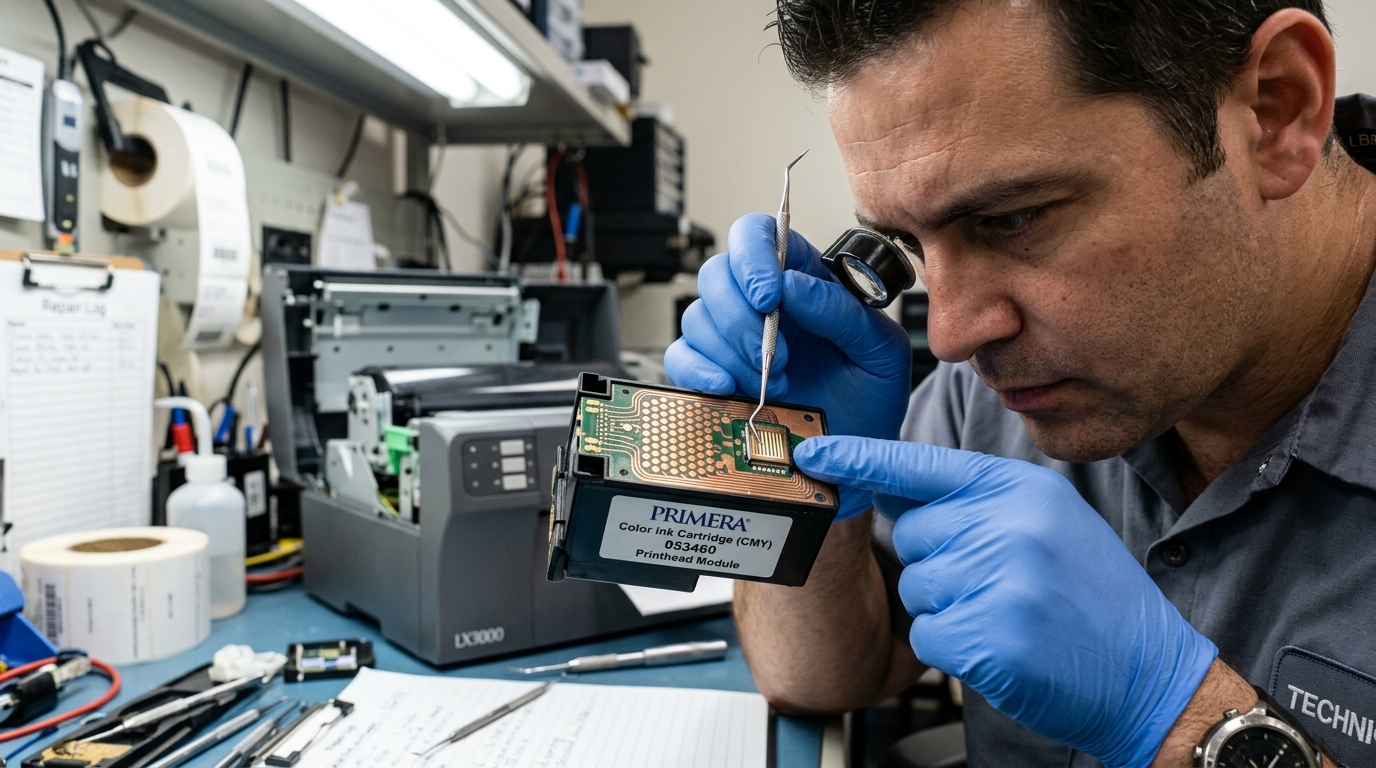
The back of the printhead features dozens of flat copper/gold squares. These align with spring-loaded pogo pins inside the printer carriage.
- Corrosion from Ink Leaks: If a third-party cartridge leaks ink down the back of the printhead, it can short circuit these copper pads. This is the leading cause of sudden printhead death. Clean the pads immediately with 99% isopropyl alcohol.
- Scratched Pads: If a user aggressively scrubs the contacts with a rough cloth or a screwdriver to clean them, the thin copper plating will scratch off, breaking the electrical circuit permanently. Always use a soft coffee filter or lint-free swab.
- If the contacts are physically gouged or burned (black scorch marks), the printhead cannot be repaired. A new OEM printhead must be ordered.
Monitoring Printhead Life and Restoring Damaged Contacts on Primera Printers
Primera label printers (LX500, LX900, LX2000, LX3000). Disc publishers monitor printhead health via a digital duty-cycle counter that calculates thermal firings across all nozzle banks.
When printhead life drops to 0%, or when physical electrical contacts become corroded or bent, print quality degrades into severe horizontal banding, color dropouts. Fatal hardware alarms.
Step-by-Step Contact Inspection & Printhead Maintenance
- Checking Printhead Life Percentage in PTStatus:
Open PTStatus Monitor on your PC. Click the Printhead Info tab. You will see a percentage gauge reflecting remaining printhead life. When life falls below 10%, nozzle micro-heaters begin failing, leading to permanent streaks that software cleaning cannot resolve.
- Repairing and Straightening Carriage Spring Pins:
Remove the printhead assembly. Use a bright inspection light to examine the gold-plated spring pins inside the carriage connector socket. If a pin is bent downward or pushed flat against the plastic chassis, use non-conductive fine tweezers to gently lift the pin back into 45-degree alignment.
- Cleaning Surface Ink Contamination from Contact Terminals:
Ink mist and dried pigment often bridge adjacent voltage pins, causing false "Printhead Defective" errors. Clean the contact array on both the printhead and the carriage using 99% anhydrous isopropyl alcohol and foam swabs.
- Replacing the Printhead Assembly:
If the printhead life is 0% or physical micro-heaters have burned out, install a genuine OEM replacement printhead (LX900 Part # 53470, LX2000 Part # 53461, Bravo 4200 Part # 53471). Follow the on-screen calibration wizard to align the new head.
Frequently Asked Questions
Can I reset the printhead life counter in software without replacing the printhead?
No. The printhead life counter is permanently written into the printhead's onboard cryptographic EEPROM and cannot be reset through driver utilities.
What is the difference between an integrated cartridge printhead and a modular printhead?
Models like the LX500 use integrated cartridges (where a new printhead is built into every ink tank). Models like the LX900 and LX2000 use modular separate printheads that outlast multiple individual ink tanks.
