


Introduction
The Zebra ZD420 is a robust and highly versatile desktop label printer widely utilized in logistics. Healthcare. .
Retail environments for generating barcodes, shipping labels, and asset tags. It offers the flexibility of both direct thermal and thermal transfer printing.
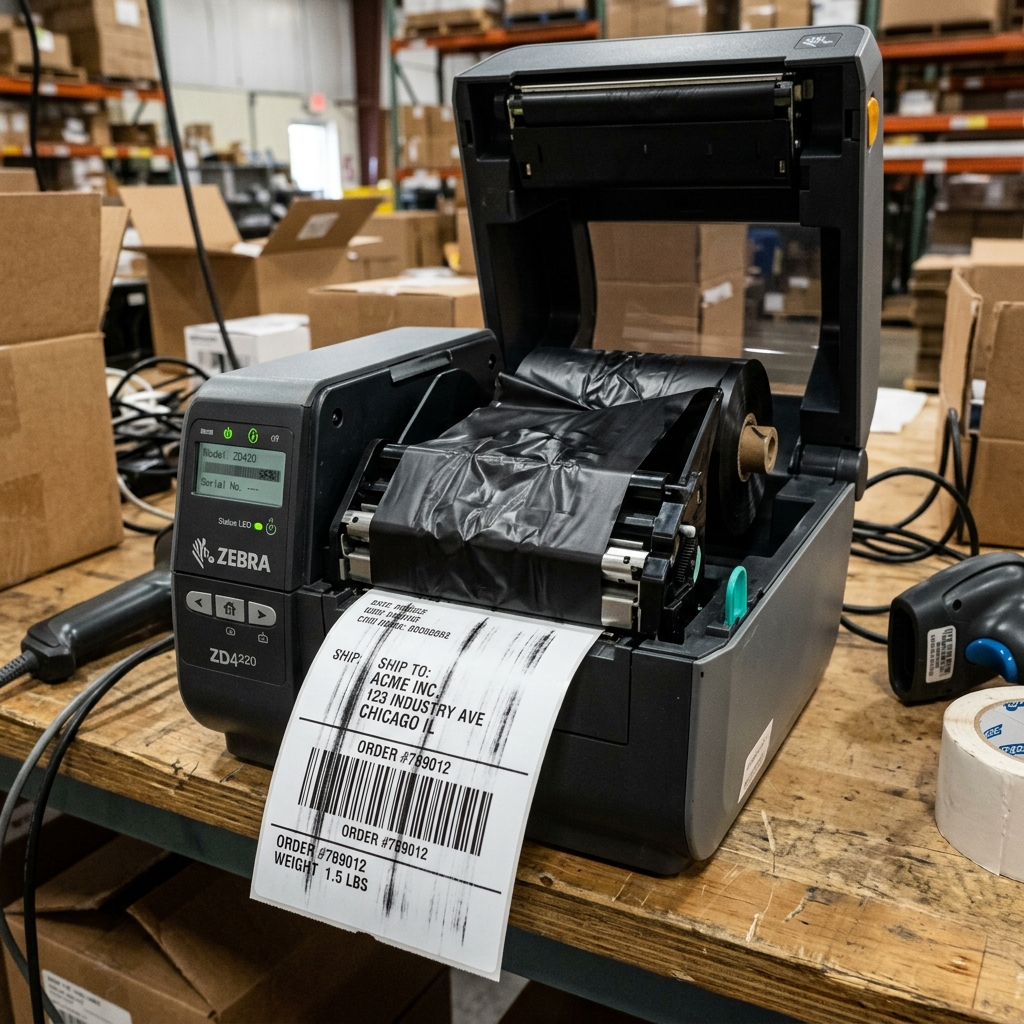
However, a pervasive issue that operators frequently face is degraded print quality. Manifesting as streaky lines.
Diagonal blank voids. Faded text, and inconsistent barcode contrast.
These defects can render barcodes unreadable by scanners, leading to significant logistical bottlenecks and compliance failures. The most common culprit behind these specific visual defects in thermal transfer mode is "ribbon wrinkle." This occurs when the thermal transfer ribbon fails to remain perfectly flat as it passes between the printhead .
The label media. Folding over itself .
Preventing ink transfer in the wrinkled areas. This extensive guide is designed to dissect and eliminate the root causes of streaky lines .
Inconsistent quality on your Zebra ZD420. Focusing heavily on diagnosing .
Curing ribbon wrinkle, alongside addressing printhead maintenance and media settings.
Achieving crisp, dark, and consistent thermal prints requires a perfectly balanced ecosystem within the printer. The thermal printhead must apply exact heat, the platen roller must provide uniform pressure.
The media must feed at a precise speed. . Most importantly for thermal transfer, the ribbon must maintain optimal tension without slipping or crinkling.
When any element of this delicate mechanical choreography falls out of alignment, the resulting print quality suffers instantly. This guide will provide warehouse managers and IT technicians with a rigorous, step-by-step diagnostic process to identify whether the issue stems from improper loading.
Mechanical wear. Environmental factors.
Or incorrect software settings, ensuring your Zebra ZD420 returns to producing flawless, scannable labels.
Why This Happens
Ribbon wrinkle, the primary cause of diagonal streaky lines, happens when uneven tension is applied to the thermal transfer ribbon. If the ribbon supply spindle or the take-up spindle is not seated correctly.
Or if the ribbon. Is loaded slightly askew.
One edge of the ribbon is pulled tighter than the other. As the ribbon passes beneath the intense heat .
Pressure of the printhead.. This uneven tension causes the thin film to buckle and fold.
Where the fold occurs, the ink is not in direct contact with the label. Resulting in a distinct.
Usually diagonal. Unprinted white line across the label.
Furthermore, using a ribbon that is significantly wider than the label media can exacerbate wrinkling.. As the unsupported edges of the ribbon lack tension .
Are prone to crinkling.
Inconsistent quality, such as generally faded prints or vertical streaks (as opposed.. To diagonal).
Is often caused by a dirty or damaged printhead. The ZD420 printhead contains hundreds of microscopic heating elements.
As labels and ribbons pass over it, adhesive residue. Paper dust. .
Environmental dirt accumulate on the glass surface of these elements. This dirt acts as an insulator, preventing the heat from effectively transferring the ink or activating the thermal paper.
If this buildup is left uncleaned. It can permanently bake onto the printhead or cause individual heating elements to burn out entirely.
Creating permanent. Unfixable vertical white lines down every label.
Software settings and media mismatch also play a critical role. If the printer's darkness setting (burn temperature) is set too low for the specific type..
Of ribbon or label material being used. The print will appear faded and grey.
Conversely, setting the darkness too high can cause the ribbon to melt. Snap.
Or stick to the labels. Creating a smudged mess and rapidly degrading the printhead.
Similarly, printing at speeds too fast for the media type prevents sufficient.. Heat transfer time.
Resulting in poor adhesion and inconsistent coverage.
Step-by-Step Fix
- Proper Ribbon and Media Loading: This is the most crucial step to fix ribbon wrinkle. Open the printer and completely remove the ribbon and labels. Reload the labels, ensuring the media guides are snug against the edges of. The roll. . Not so tight that they bend the paper. Next, reload the ribbon. Ensure the ribbon supply and take-up cores are pushed all the way flush against the right-side flanges. The ribbon must track straight. Tape the ribbon securely to the take-up core . Manually turn the take-up gear a few. Rotations to ensure the ribbon is perfectly flat . Taut before closing the printhead.
- Match Ribbon Width to Media Width: Verify that your ribbon is appropriate for your labels. Ideally, the ribbon should be only slightly wider than the label media (e.g., a 4.33" ribbon for a 4" label). Using a 4" ribbon on a 2" label leaves too much unsupported ribbon, vastly increasing the likelihood of wrinkling. Switch to a narrower ribbon if necessary.
- Thoroughly Clean the Printhead: Turn off the printer. Open the printhead mechanism. Use a Zebra-approved cleaning pen or a lint-free swab heavily saturated with 99% isopropyl alcohol. Firmly wipe the swab back and forth across the brown/black glass line of the printhead. You should see dark residue coming off on the swab. Repeat until the swab comes away completely clean. Allow the alcohol to evaporate fully before printing.
- Clean the Platen Roller: The rubber platen roller beneath the printhead provides the backing pressure. If it is dirty or has adhesive stuck to it, it causes uneven pressure and poor print quality. Wipe the platen roller with an alcohol swab, manually rotating it to clean the entire circumference. Inspect the roller for cuts, gouges, or hardened glossy areas. If damaged, the platen roller must be replaced.
- Adjust Print Darkness and Speed Settings:Access the printer settings via the Zebra Setup Utilities software on.. Your PC. Or via the printer's web interface (if networked). Lower the print speed (e.g., drop from 6 ips to 4 ips or 2 ips). Increase the darkness setting gradually (e.g.. From 15 to 20. Up to. A maximum of 30) until the print is crisp and dark. Test print after every adjustment.
- Perform a Media Calibration: The printer needs to know the exact length and gap size of your labels. Press and hold the Feed and Cancel buttons simultaneously for two seconds to initiate an auto-calibration. The printer will feed several labels and measure the gaps/black marks. This ensures the print starts precisely at the top of the.. Label. Preventing alignment issues that can look like quality defects.
Advanced Troubleshooting
If ribbon wrinkle persists despite perfect loading and matched widths, the mechanical tension mechanisms within the printer may be failing. The ZD420 utilizes spring-loaded clutch systems on the ribbon spindles to maintain back-tension.
If these clutches wear out. Become contaminated with dust.
Or lose their spring force. The printer cannot physically keep the ribbon taut.
This is a complex mechanical failure requiring disassembly of the ribbon carriage . Replacement of the clutch assemblies. .
Is best performed by a certified Zebra repair technician.
For persistent vertical white lines that do not disappear after rigorous printhead.. Cleaning with 99% alcohol.
The printhead has likely suffered physical damage. A single grain of sand on a label or a scratch from...
A ring can sever a heating element on the printhead. Once an element is blown, it can never heat up again, resulting in a permanent vertical void.
In this scenario, no amount of cleaning or software adjustment will fix the issue. The..
Entire printhead assembly must be physically replaced with a new OEM Zebra part.
Lastly, evaluate the quality and compatibility of your supplies. Cheap, generic ribbons or low-quality label stock frequently cause issues.
Wax ribbons require lower heat but smudge easily. Resin ribbons provide durable prints but require much higher heat and slower speeds.
Ensure you are using the correct ribbon formulation (Wax. Wax/Resin.
Or. Resin) matched to your specific label material (Paper, Polypropylene, Polyester).
Incompatible materials will yield terrible print quality regardless of how well the printer is tuned.
FAQ
How often should I clean my Zebra ZD420 printhead?
Best practice dictates cleaning the printhead every time you change a roll of ribbon (for... Thermal transfer) or every time you change a roll of labels (for direct thermal).
Can I use rubbing alcohol from the pharmacy to clean the printer?
Standard rubbing alcohol (70%) contains too much water. Takes a long time to dry .
Why is the ribbon sticking to the labels after printing?
This is usually caused by the darkness (burn temperature) setting being way too high for the ribbon formulation. The intense heat melts the ribbon backing directly onto the label surface.
What is the difference between Direct Thermal and Thermal Transfer?
Direct Thermal uses heat-sensitive paper that turns black when heated by the printhead. It requires no ribbon.
