


Introduction
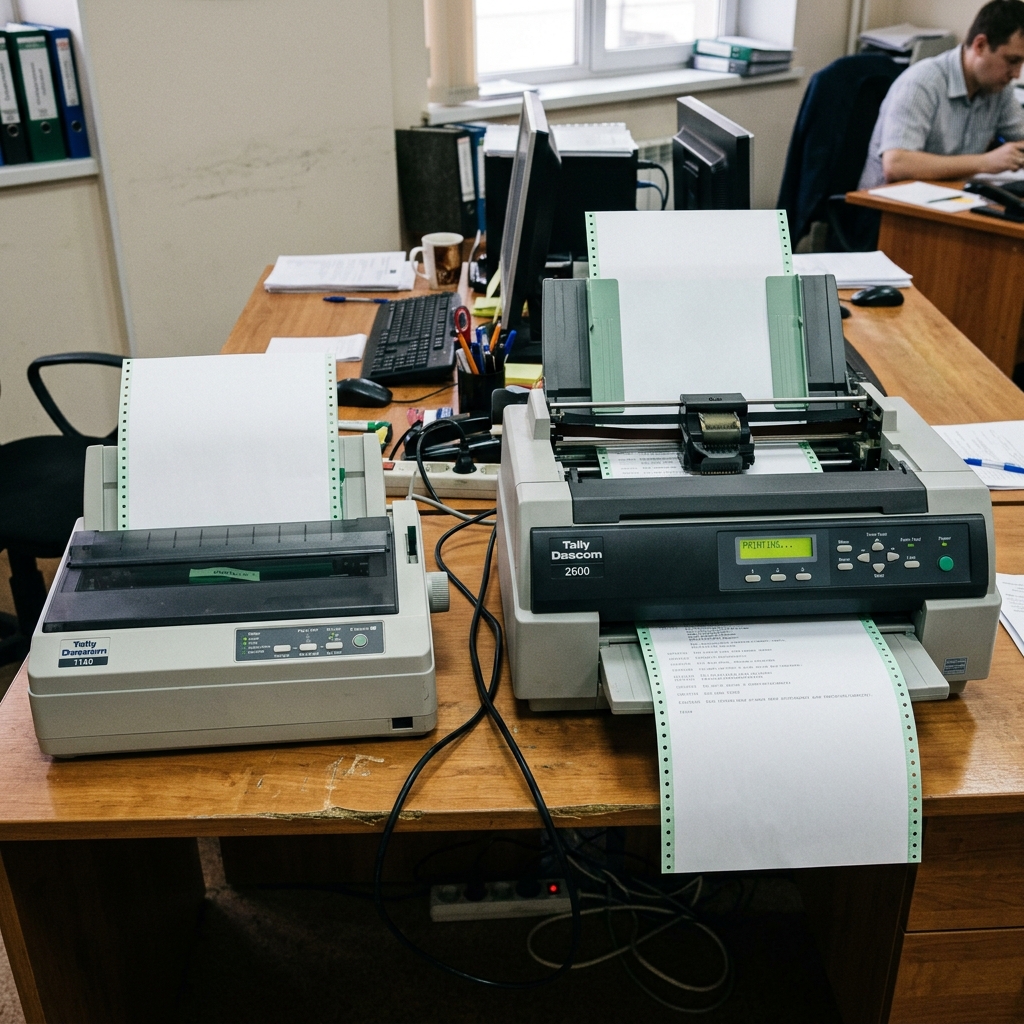
Choosing the right dot matrix printer for industrial, logistics, or back-office operations is a critical decision where durability and continuous operation are paramount. The Tally Dascom 1140 and the Dascom 2600 represent two very different tiers of impact printing, tailored for entirely different scales of operation.
Impact printers remain indispensable for printing multi-part forms (like carbon-copy invoices, weighbridge tickets, and bill of lading documents) where modern laser or inkjet technologies simply cannot function. The 1140 is a compact, entry-level workhorse designed for front-desk applications and light-to-medium transactional printing.
Conversely, the 2600 is a heavy-duty, wide-carriage beast engineered for continuous, high-volume batch processing in harsh environments. This comprehensive guide will dissect the technical specifications, mechanical limits, and ideal use cases for both machines, ensuring you invest in the correct hardware to prevent costly bottlenecks in your mission-critical printing workflow.
Why This Happens: The Mechanics of Impact Printing Tiers
The stark differences between the 1140 and the 2600 stem from their fundamental mechanical engineering and intended workload. Dot matrix printers fail primarily when they are pushed beyond their specified duty cycles.
The Tally Dascom 1140 features a 9-pin print head and a standard 80-column carriage. It is designed to handle roughly 10,000 pages per month.
If you attempt to run continuous batch jobs 24/7 on the 1140, the print head will overheat, the ribbon drive mechanism will wear out prematurely, and paper jams will become frequent as the lightweight tractors struggle with heavy, multi-part continuous forms. The Dascom 2600, on the other hand, is a 24-pin, 136-column wide-carriage printer built with industrial-grade metal chassis components.
It boasts a massive workload capacity, designed to run continuously. It features advanced paper handling, including automatic gap adjustment for varying form thicknesses.
Choosing the wrong tier results in either catastrophic hardware failure from overloading an 1140, or massive financial waste by over-investing in a 2600 for a small office that only prints a dozen invoices a day.
Step-by-Step Fix: Analyzing Workload and Form Requirements
- Analyze Multi-Part Form Thickness: Determine exactly how many copies your forms have. The 1140 is rated for 1 original plus 4 copies (1+4). The 2600 can handle thicker forms, often rated for 1 original plus 5 or 6 copies. If your forms are too thick, a smaller printer will jam or produce illegible lower copies.
- Measure Form Width (Columns): Standard letter/A4 paper requires an 80-column printer like the 1140. If you are printing wide financial spreadsheets, large schematics, or specialized wide shipping manifests, you absolutely require the 136-column width of the 2600.
- Calculate Monthly Print Volume (Duty Cycle): Track your printing for a week and multiply. If you are printing under 10,000 pages a month in short, intermittent bursts, the 1140 is perfectly adequate. If you are doing overnight batch runs exceeding tens of thousands of pages, the 2600 is mandatory to prevent thermal shutdown.
- Evaluate Print Speed Requirements: The 1140 prints at a respectable 400 characters per second (cps) in draft mode. The 2600 pushes this significantly higher, often exceeding 680 cps. In a logistics hub where trucks are waiting for paperwork, the speed difference translates directly to operational efficiency.
- Assess the Operating Environment: Where will the printer live? The 1140 has a smaller footprint suitable for a desktop or retail counter. The 2600 is large, heavy, and noisy; it belongs in a dedicated server room, warehouse floor, or enclosed printer stand with acoustic dampening.
- Determine Connectivity Needs: Check your legacy systems. Both usually offer USB and Parallel ports standard. However, the 2600 often has more robust modular options for Ethernet or Serial connections required by legacy AS/400 or mainframe systems.
- Review Print Quality (Pins): The 1140 is typically a 9-pin printer, producing rugged, legible text but poor graphics. The 2600 is available in 24-pin configurations, allowing for much higher resolution text (Letter Quality) and the ability to print readable barcodes directly on the impact forms.
- Analyze Total Cost of Ownership (Ribbon Yield): Don't just look at the hardware price. The 1140 uses smaller ribbons requiring frequent changes. The 2600 uses massive ribbon cartridges designed to yield millions of characters before replacement, lowering the cost-per-page for high-volume users.
- Consider Paper Paths: The 2600 offers sophisticated paper handling, often with dual tractors, allowing two different types of forms to be loaded simultaneously and selected via software, whereas the 1140 generally requires manual intervention to switch form types.
- Consult Legacy Software Documentation: Ensure your ERP or accounting software has specific drivers for the model you choose, or at least supports the precise emulation modes (like Epson FX or IBM ProPrinter) that these printers utilize.
Advanced Troubleshooting: Form Alignment and Emulation
When deploying these printers, advanced setup often involves agonizing over Top-of-Form (TOF) alignment and emulation mapping. If you replace an old printer with an 1140 or 2600 and the text slowly drifts down the page with every new invoice, the issue is not hardware, but page length configuration.
Impact printers measure page length in inches or lines-per-inch (LPI). If your software sends a form feed command expecting a 12-inch form, but the printer hardware is set to 11 inches via its front panel menu, the drift occurs.
You must dive into the printer's deep menu configuration (often navigating via a complex sequence of panel buttons) to hardcode the precise physical dimensions of your tractor-feed paper. Furthermore, legacy systems often send raw control codes intended for ancient IBM printers.
If the Dascom is set to Epson emulation while receiving IBM commands, the result is random ASCII characters or chaotic formatting. Matching the emulation mode to the host software's output is an advanced but critical step for successful integration.
FAQ
Can the Tally Dascom 1140 print barcodes?
While a 9-pin printer like the 1140 can technically print graphics, the resolution is generally too low to produce reliably scannable barcodes. For barcode printing on multi-part forms, a 24-pin printer like the 2600 is highly recommended.
What does '1+4 copies' mean for multi-part forms?
This specifies the impact power of the print head. It means the printer can strike hard enough to cleanly print on the original top sheet and successfully transfer the carbon impression through up to 4 additional underlying copies.
Why is the Dascom 2600 so much more expensive?
The 2600 is built for continuous, industrial use. The cost reflects the heavy-duty metal chassis, high-torque tractor motors, advanced print head cooling systems, and the wide 136-column carriage, components not found in desktop models.
Do these printers work with Windows 10/11?
Yes, Tally Dascom provides updated Windows drivers for both models. However, they are often used with older ERP systems or custom software that bypasses Windows entirely, communicating directly via raw ports.
How often do I need to replace the print head?
Print heads are highly durable, often rated for hundreds of millions of characters. They usually only fail prematurely if you use cheap, abrasive third-party ribbons or if you force the printer to print on forms thicker than its specified rating.
