


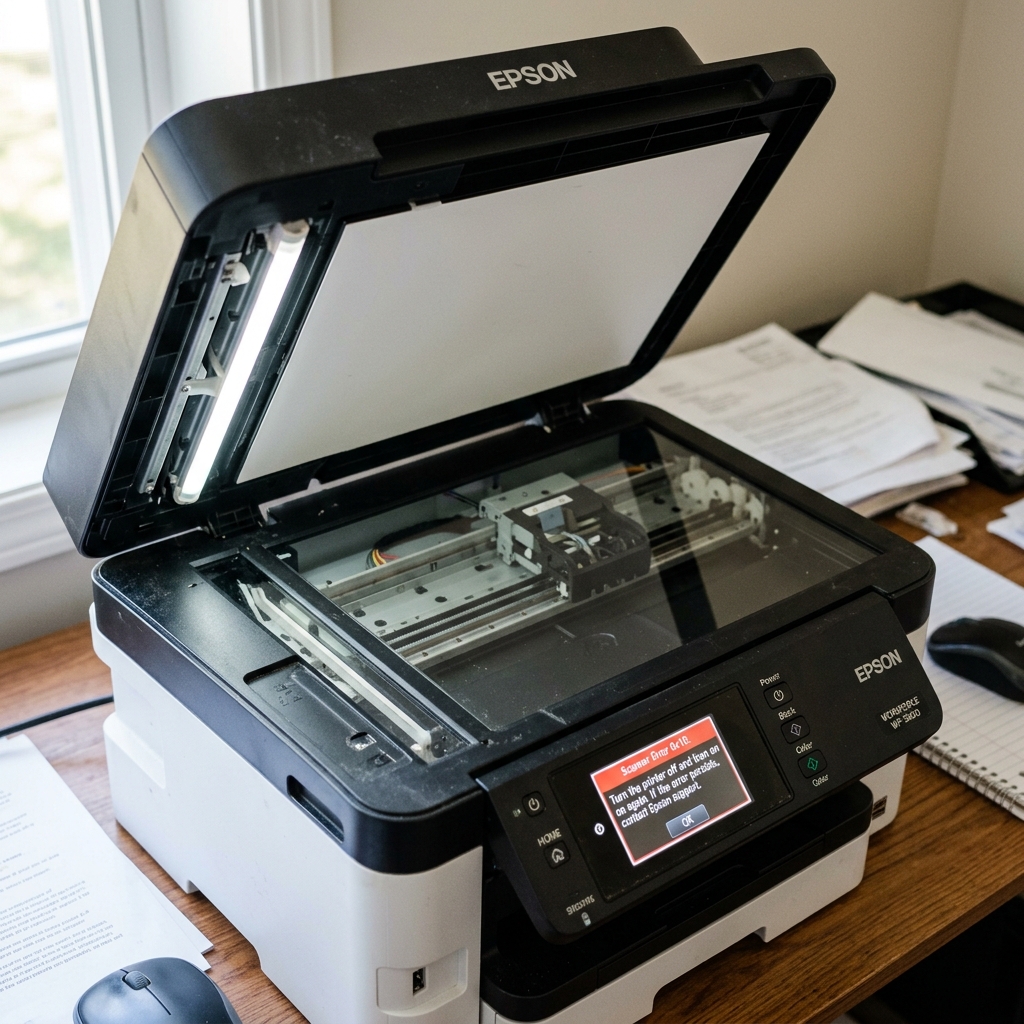
Understanding Scanner Error 0x10
Modern Epson all-in-one printers are highly integrated. During the boot sequence, the motherboard checks the health of the printhead, the paper feed rollers, and the scanner unit. If the scanner unit fails its self-test, the entire printer locks down and throws Error Code 0x10.
This means that even if you only want to print a black-and-white Word document, a broken scanner will prevent you from doing so. Error 0x10 specifically points to a mechanical or sensory failure within the flatbed scanner assembly.
Diagnostic 1: The Scanner Bar Movement Test
To figure out what is wrong, you need to watch the scanner bar during startup.
- Turn the printer off.
- Lift the top lid so you have a clear view of the scanner glass and the long rectangular scanner bar underneath it.
- Turn the printer on and watch the bar closely.
Scenario A: The Bar Vibrates and Grinds Violently
If the bar immediately slams into the far left side of the printer and makes a horrible grinding noise, the scanner motor is working, but the Home Sensor is blind. The printer expects the bar to see a specific white reference strip under the glass on the far left to know it has reached the edge.
If the underside of the glass is dirty, or the sensor has failed, the motor just keeps pushing, causing the gears to slip and grind. The Fix: You must disassemble the top glass (usually held by a few screws under plastic caps) and clean the underside of the glass and the scanner bar's optical eye with glass cleaner.
Scenario B: The Bar Makes No Sound and Doesn't Move
If you turn the printer on and the scanner bar remains completely dark and stationary, the motherboard is unable to communicate with the scanner. The Fix: Lift the scanner unit up and inspect the wide, flat white ribbon cable that connects the scanner bed to the main chassis.
If it has been tugged loose or crimped, reseat it. If the cable is fine, the scanner motor itself has burned out.
Diagnostic 2: The Drive Belt
The scanner bar is pulled left and right by a thin, toothed rubber belt driven by a small DC motor. Over time, especially in hot climates, this rubber belt can dry rot, stretch, or snap completely.
If you hear the scanner motor whining, but the bar isn't moving, the belt is the culprit.
- With the printer unplugged, shine a flashlight through the glass at the track the scanner bar rides on.
- Look for the rubber belt. Is it hanging loose? Are teeth shredded off it?
- If the belt is broken, you can purchase a replacement online. Replacing it requires removing the glass bed, looping the new belt around the motor gear and the tension pulley, and hooking it into the plastic tabs on the bottom of the scanner bar.
Is it worth repairing?
If a ribbon cable is loose or the glass is dirty, error 0x10 is a free and easy fix. However, if the scanner motor has burned out, finding a replacement motor for your specific model can be difficult.
Because the printer will not function without a working scanner, a dead scanner motor often means it is time to replace the entire printer.
Understanding Epson Scanner Error 0x10 (CIS Home Position & Motor Fault)
Error 0x10 is a dedicated Scanner Subsystem Fatal Malfunction on Epson multifunction all-in-one printers. During power-on bootup, the scanner's Contact Image Sensor (CIS) carriage travels across the flatbed glass to find the home positioning optical interrupter and calibrate white balance against the reference tile.
If the scanner carriage is physically blocked, if the drive belt slips, or if the CIS sensor fails, Error 0x10 locks the entire machine.
Step-by-Step Diagnostic & Scanner Clearing Workflow
- Check the Scanner Transit Lock Switch:
Look underneath or on the side of the scanner flatbed assembly. Ensure the sliding mechanical transit lock (padlock icon) is set to the Unlocked position.
- Clean the White Calibration Reference Strip:
Lift the scanner lid. Look at the narrow glass strip on the far left beneath the plastic bezel. Clean this area with optical glass cleaner and a microfiber cloth. If dust, tape adhesive, or correction fluid clouds this white strip, the CIS sensor cannot calibrate white balance and trips 0x10.
- Inspect the Scanner Drive Belt & Rail:
Open the scanner casing if accessible. Ensure the small ribbed rubber drive belt is seated properly on the stepper motor cog and that the optical carriage slides freely along its guide rail.
- Perform a Full 15-Minute Hardware Power Drain:
Unplug the AC power cord from the wall. Hold down the Power button for 30 seconds. Leave unplugged for 15 minutes to reset the scanner motor driver IC registers.
Frequently Asked Questions
Can I print documents when Error 0x10 is displayed?
Because Epson firmware requires all subsystems to pass boot diagnostics, an active 0x10 scanner error locks the entire printer, preventing document printing until the scanner issue is cleared.
Does cold room temperature cause Error 0x10?
Yes. In rooms below 50°F (10°C), the CIS sensor lamp takes longer to warm up to operating brightness, triggering a timeout 0x10 error on boot.
