


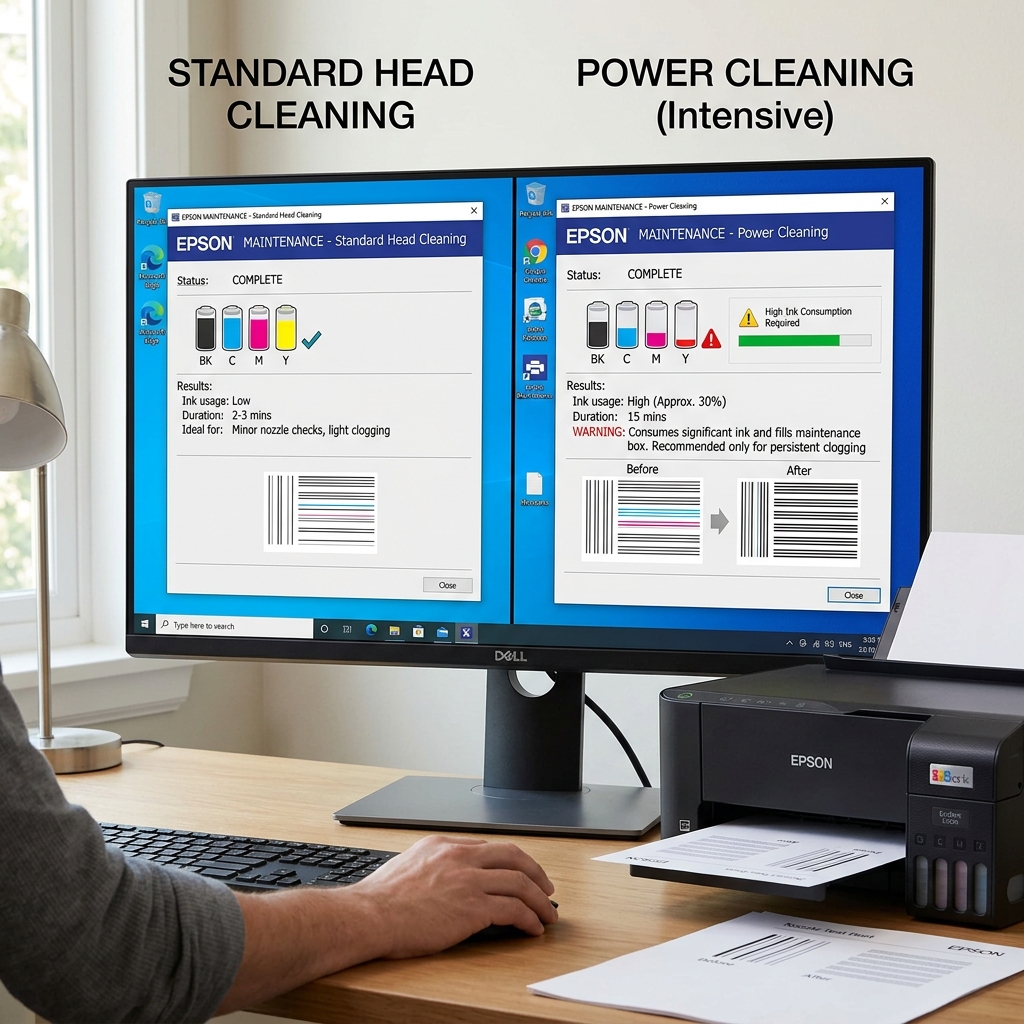
Understanding Epson's Built-In Maintenance Tools
If you own an Epson printer and suddenly experience banding, faded colors, or blank pages, your first instinct is to go into the maintenance menu and run a cleaning cycle. However, Epson gives you two options: Head Cleaning and Power Cleaning (sometimes called Power Ink Flushing).
Many users assume Power Cleaning is just a "better" version of Head Cleaning and run it immediately. This is a costly mistake. Understanding the mechanical difference between these two processes will save you ink, money, and potentially the lifespan of your printer.
The Standard Head Cleaning
A standard Head Cleaning is your first line of defense against poor print quality.
How it works mechanically:
When you trigger this cycle, the printhead carriage moves to the far right side of the printer and docks onto the capping station (a small rubber pad connected to a suction pump). The pump engages lightly, creating a small vacuum that pulls a few drops of fresh ink from the cartridges, down through the microscopic printhead nozzles, and out into the waste pad.
When to use it:
- When a nozzle check shows a few missing breaks or gaps in the grid.
- When the printer has been sitting unused for a week or two and prints look slightly faded.
- When you just installed a brand new ink cartridge and need to prime it.
The Cost: A standard Head Cleaning uses a very minimal amount of ink. You can safely run 2 or 3 of these cycles in a row without draining your wallet or overflowing your internal waste pad.
The Power Cleaning (Power Ink Flushing)
A Power Cleaning is a massive, aggressive mechanical operation. Epson actually hides this option deep in the settings or limits you to running it only once every 12 hours, and for good reason.
How it works mechanically:
The printhead docks on the capping station, but instead of a light vacuum, the printer's pump goes into overdrive. It forcefully sucks massive amounts of ink through the system at high velocity.
On EcoTank models, this is designed to literally pull the ink all the way from the external tanks, through the long silicone tubes, through the dampers, and out the printhead.
When to use it:
- On EcoTanks: When you look at the translucent ink tubes inside the printer and see massive air bubbles or completely empty tubes. (A standard cleaning does not have the suction power to pull air through a 12-inch tube).
- When a standard cleaning has been run 3 times with zero improvement, and the printer sat unused for several months.
The Massive Risks:
You should avoid Power Cleaning unless absolutely necessary due to three massive drawbacks:
- Extreme Ink Waste: A single Power Cleaning can consume anywhere from 10% to 20% of your total ink tank capacity in one go. You are literally flushing dollars down the drain.
- The Waste Pad Limit: All that purged ink goes directly into the printer's internal Maintenance Box (Waste Ink Pad). Running just two Power Cleanings is often enough to fill the pad, triggering the fatal "Parts inside your printer are at the end of their service life" error and bricking the printer until serviced.
- Printhead Strain: Forcing thick fluid through microscopic ceramic nozzles at high velocity generates pressure and heat, which can damage older printheads.
The 12-Hour Rule
If you run a standard cleaning and the nozzles are still clogged, do not immediately run a Power Cleaning. Epson pigment ink dries hard.
A standard cleaning pulls fresh, wet ink down onto the hard clog. If you let the printer sit turned off for 12 hours, the fresh wet ink will chemically dissolve the hard clog on its own.
Often, simply waiting overnight and printing a test page the next morning completely resolves the issue without wasting any more ink.
Head Cleaning vs. Power Cleaning: Engineering Comparison
Epson Micro Piezo printheads feature two distinct fluidic maintenance cycles: the standard Head Cleaning and the intensive Power Cleaning (Ink Flush). Understanding the fluid dynamics, ink volume consumed, and mechanical pump operations of each cycle is essential to avoid wasting ink or damaging the printhead.
Detailed Engineering Comparison Matrix
| Feature / Specification | Standard Head Cleaning | Power Cleaning (Ink Flush) |
|---|---|---|
| Execution Time | 1.5 to 2.5 minutes | 8 to 12 minutes (continuous pulsed pumping) |
| Ink Consumption | ~2% to 4% of total ink volume | ~25% to 35% of total ink tank capacity |
| Primary Purpose | Clears surface nozzle crusts and minor pigment blockages. | Flushes massive air locks from supply tubes and clears severe dried sediment. |
| Frequency Restriction | Max 2-3 consecutive cycles, then 2-hour rest. | Strictly once per 12 hours (firmware lock enforced). |
Frequently Asked Questions
Why does Power Cleaning require so much maintenance box space?
Because Power Cleaning flushes up to 35ml of liquid ink into the waste reservoir, the firmware requires at least 30% available capacity in the maintenance box before allowing the cycle to start.
Can Power Cleaning fix a printer that sat unused for a year?
Yes. Power Cleaning is specifically engineered to pull fresh liquid ink through dried silicone delivery tubes, re-hydrating hardened pigment in the printhead manifold.
