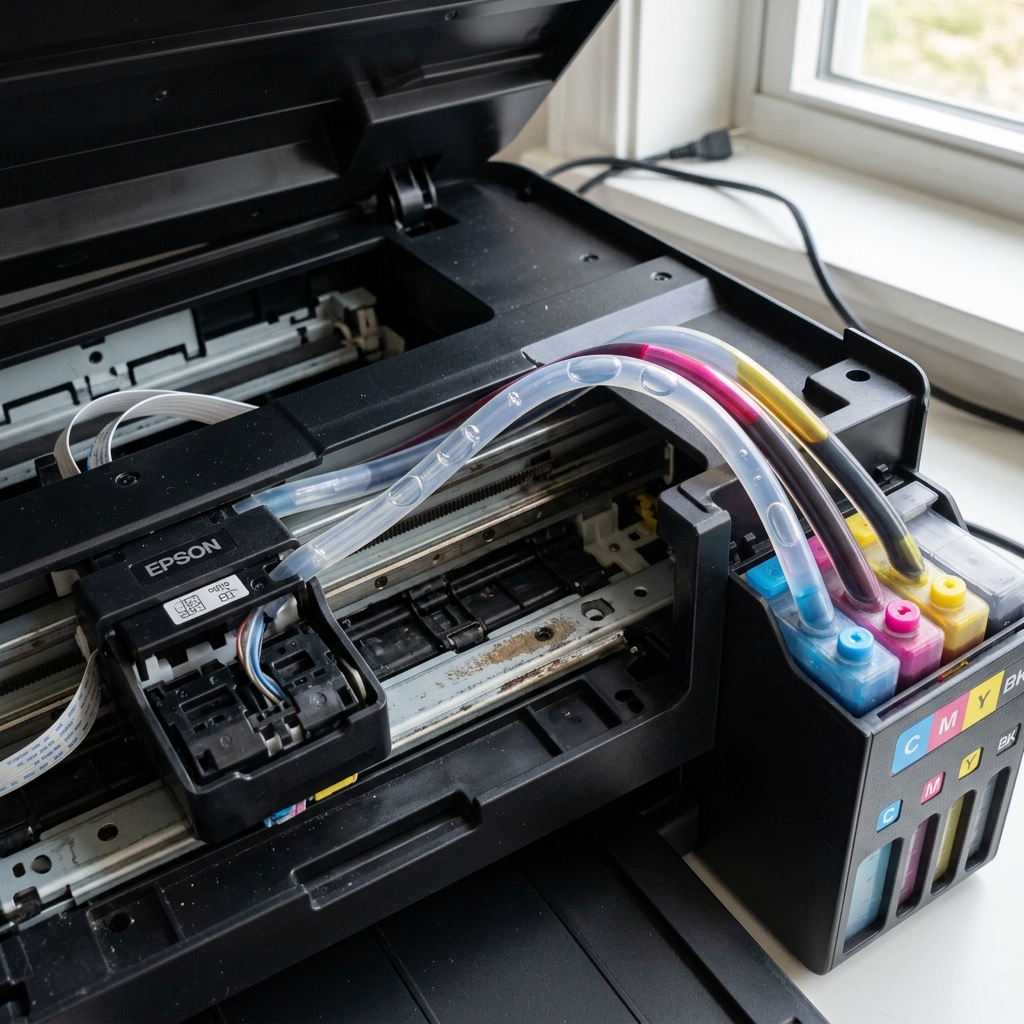
The "Missing Colors" Phenomenon
It is a bizarre issue: You print a full-color photograph, but it comes out as varying shades of pure yellow. Cyan, Magenta, and Black are completely absent. You run a Nozzle Check, and only the yellow stair-step grid prints.
If three out of four colors fail simultaneously on an EcoTank, it is rarely a coincidence and almost never a standard dried-ink clog. It is caused by a massive loss of vacuum pressure in the ink delivery system.
Cause 1: Running the Tanks Dry
EcoTanks hold a massive amount of ink, which makes users complacent. They forget to check the visible levels on the front of the machine. If you allow the Cyan, Magenta, and Black tanks to drop below the bottom line, the printer will start sucking pure air into the silicone tubes.
Once air hits the dampers (the mini-cartridges on top of the printhead), the vacuum is broken. The printhead fires, but it's only firing empty air. Yellow might still be printing simply because that specific tank had a tiny bit more ink left than the others.
The Fix: Refill all tanks to the top line immediately. However, simply refilling the tanks does not fix the air trapped in the tubes.
You must run a Power Cleaning (Power Ink Flushing) via the maintenance menu on your computer. This high-pressure pump cycle will suck the air out of the tubes and draw the new ink down into the printhead.
Cause 2: Transport and Tipping
If your tanks are full, but you recently moved houses or shifted the printer to a different desk, you likely caused an air lock. If an EcoTank is tilted past 45 degrees, the liquid ink inside the dampers sloshes backward, allowing a massive air bubble to enter the printhead valves.
The Fix: If you see massive air gaps in the silicone tubes, you must use a syringe to manually bleed the air out of the dampers (see our guide on Syringe Flushing EcoTanks), or run a Power Cleaning cycle.
Cause 3: The Blown Printhead Channel (Fatal)
If your ink tubes are perfectly solid with no air bubbles, you have run head cleanings, and the printer still only prints one color, you may have a catastrophic printhead failure.
Inside the printhead, the four colors are separated by microscopic walls. If the printhead overheats, or if you used poor-quality third-party sublimation ink that caused a chemical reaction, the internal walls can rupture or delaminate.
When this happens, the piezoelectric crystals fail to fire for certain channels. This is permanent, unrepairable physical damage that requires a full printhead replacement.
Why Epson EcoTank Printers Suddenly Print Only One Color
When an EcoTank printer prints only yellow, only black, or fails to print composite colors, the issue is physical air intrusion in the silicone ink delivery lines, a clogged color damper, or an unseated printhead ribbon cable.
Complete 4-Step Color Subsystem Restoration
- Visual Inspection of Ink Lines (The Air Bubble Check):
Lift the scanner bed to inspect the clear silicone tubes running from the front ink reservoirs to the moving carriage. If you see large clear air gaps (several inches long) in the Cyan or Magenta tubes, no liquid ink is reaching the printhead nozzles.
- Execute a Power Cleaning Cycle:
Go to Settings > Maintenance > Power Cleaning. The printer will run an intensive 8-minute pump cycle that draws ink through all four tubes simultaneously, purging air pockets into the waste box.
- Manual Damper Syringe Priming (Direct Line Purge):
- Unplug power and remove the carriage cover.
- Gently unclip the four color damper cartridges.
- Insert the tip of a blunt plastic syringe into the circular outlet valve of the missing color damper.
- Gently pull the plunger back until 1-2ml of solid, bubble-free ink flows into the syringe.
- Re-clip the damper into the carriage.
- Check Print Driver Color Settings:
In Windows Print Preferences, verify that the color management setting is not accidentally locked to "Monochrome" or a corrupted custom ICC profile.
Frequently Asked Questions
Why does the missing color return for one page after cleaning and then disappear again?
This classic symptom indicates a clogged damper filter or a pinched ink supply tube. The small amount of ink pulled into the damper prints one sheet, but restricted flow prevents the damper from refilling during printing.
Can mixing dye and pigment ink cause color blockage?
Yes. Mixing pigment and dye inks inside the same reservoir can cause chemical precipitation, creating gelatinous clumps that completely seal the damper mesh.