


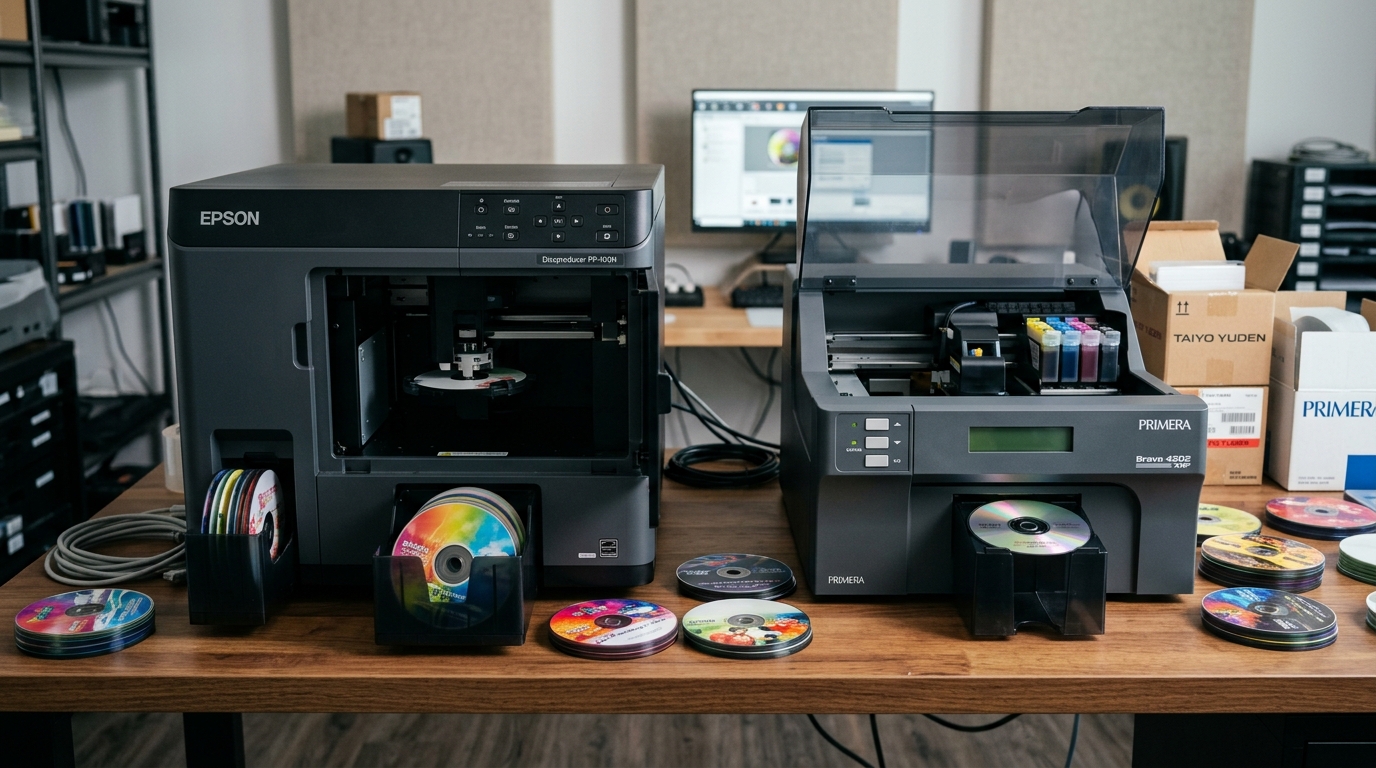
Disc Publishing Heavyweights: Epson vs Primera
Automated disc publishers are critical production tools in medical imaging (DICOM), legal archival, surveillance recording, and multimedia duplication. Two product families dominate the market: the Epson Discproducer (PP-100 and PP-50 series) and the Primera Bravo (4200 and SE-3 series).
While both brands deliver robotic media handling and on-disc inkjet printing, their underlying robotic mechanisms, ink delivery systems, and operational costs diverge substantially.
Key Specifications and Feature Comparison
Review the primary technical specifications and operating metrics for each platform:
| Feature | Epson Discproducer PP-100III | Primera Bravo 4202 XRP |
|---|---|---|
| Robotic Arm System | AcuGrip independent dual-pin robotic arm | Single-arm pivot with mechanical clamp |
| Disc Capacity | 100 discs (3 stackers of 50/50/20) | 100 discs (kiosk adapter required) |
| Ink Delivery System | 6 individual ink cartridges (PJIC) | Single multi-color cartridge (or dual CMY+K) |
| Cost Per Disc (Ink Only) | ~$0.10 – $0.14 per disc | ~$0.28 – $0.40 per disc |
| Print Technology | Micro Piezo inkjet (1440 dpi) | Thermal inkjet (4800 dpi max) |
| Drives | 2 CD/DVD/BD optical drives | 2 CD/DVD/BD optical drives |
| Software Suite | Total Disc Maker (Win/Mac) | PTPublisher & SureThing Disc Labeler |
Robotic Transport: AcuGrip vs Pivot Arm
Robotic reliability is the single most important factor in unattended production duplication:
- Epson AcuGrip Technology: The Discproducer utilizes patented AcuGrip technology. Dual interlocking pins grasp the center ring of the disc, preventing double-disc feeds even when media is sticky from static or humidity.
- Primera Bravo Pivot Arm: Primera uses an overhead robotic arm with mechanical gripping fingers. While fast, static cling between blank discs can occasionally cause two discs to be picked up simultaneously without proper fanning.
Ink Architecture and Long-Term Operating Costs
Consumables cost forms the largest operating expense over the lifespan of a disc publisher:
- Epson 6-Cartridge Piezo Architecture: Epson employs six separate high-capacity ink tanks (Cyan, Magenta, Yellow, Light Cyan, Light Magenta, Black). You only replace the specific depleted color, reducing wasted ink to near zero.
- Primera Integrated Cartridge System: Primera Bravo 4200 models utilize combined tri-color cartridges. When one color runs dry during high-volume runs, the entire cartridge must be discarded, driving up cost per disc.
Software and Medical Imaging Integration
Both platforms support industry-standard automated workflow pipelines:
- Epson Total Disc Maker: Clean, rock-solid job submission software. The PP-100N model features built-in network processing and direct DICOM PACS integration capabilities.
- Primera PTPublisher: Highly flexible with broad third-party SDK support. Excellent compatibility with courtroom recording systems and specialized medical disc software.
Which Disc Publisher Should You Choose?
Select the machine best tailored to your organization's daily throughput and operational workflow:
- Choose Epson Discproducer if: You run medium to high volumes (1,000+ discs/year), require unattended 100-disc batch reliability, and want the lowest ink cost per disc.
- Choose Primera Bravo if: You require rapid single-disc on-demand throughput, want 4800 dpi thermal print resolution, or already utilize Primera PTPublisher software integrations.
Frequently Asked Questions
Which disc publisher has the lowest cost per disc?
The Epson Discproducer is significantly cheaper per disc due to individual 6-color ink tanks that eliminate premature cartridge waste.
Can both publishers burn Blu-ray discs?
Yes, both Epson Discproducer and Primera Bravo offer Blu-ray (BD-R) configurations alongside standard CD/DVD models.
Does Epson AcuGrip prevent double-feeding of discs?
Yes, AcuGrip uses mechanical separating pins designed specifically to prevent static-stuck discs from being loaded together.
