


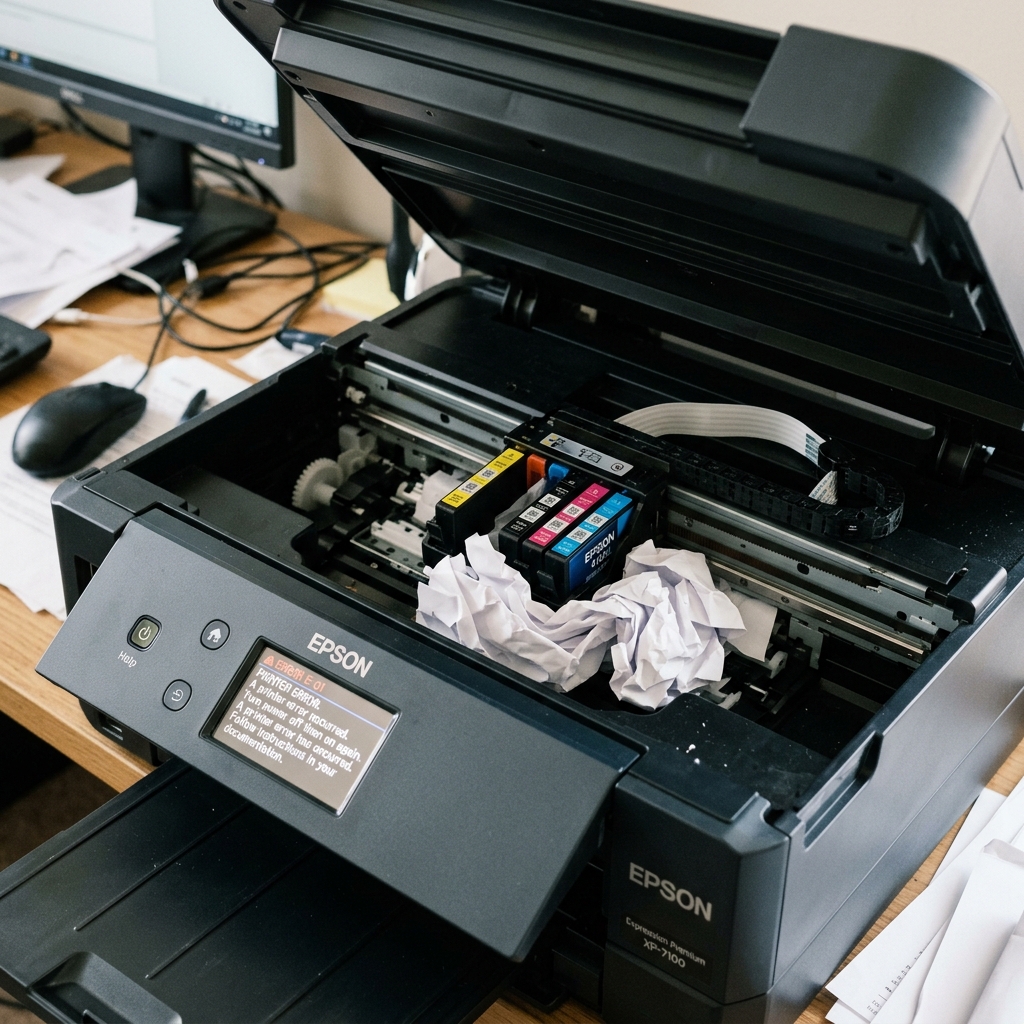
Understanding Epson Error E-01
Error E-01 is a highly common code on Epson EcoTank, Expression, and WorkForce printers. The printer's screen will usually accompany this code with a terrifying message like "Printer Error. Turn power off and on again. For details, see your documentation."
Despite the severe wording, E-01 is almost always a mechanical issue, not an electronic one. Specifically, it means the printer attempted to move the printhead carriage, and the carriage hit something, got stuck, or failed to register its movement. The printer shuts down to prevent the motors from burning out.
Fix 1: The Hidden Obstruction
In 90% of E-01 cases, there is a physical object blocking the carriage path. This isn't always a massive, obvious paper jam. Often, it's a tiny, torn scrap of paper, a staple, or a rogue paperclip that fell into the top feed tray.
- Turn the printer off and completely unplug the power cord. (Never reach into the printer while it has power).
- Lift the entire scanner bed assembly to look down into the mechanical guts of the printer.
- Take a flashlight and shine it into the far right and far left corners. The far right side is the "parking station," where the printhead rests. Scraps of paper love to hide under this station.
- Gently grasp the printhead carriage and try to slide it side to side. It should move freely. If it hits a hard stop before reaching the edge, investigate that exact spot with your flashlight.
- Use a pair of long tweezers to extract any debris you find.
Fix 2: The Scanner Lid Cable
On some Epson models, lifting the scanner lid too forcefully can pull the white ribbon cable that connects the scanner to the motherboard slightly out of its socket. If the motherboard cannot communicate with the scanner during the boot sequence, it will throw an E-01 error, halting the entire boot process.
Look at the hinges of your scanner lid. You will see a flat white cable routing down into the chassis. Ensure this cable is not torn, crimped, or sitting crooked. If you are comfortable taking off the side panel, reseating this cable on the motherboard often cures phantom E-01 errors.
Fix 3: The Dislocated Encoder Strip
Behind the printhead carriage is a thin, clear plastic ribbon called the encoder strip. The carriage has an optical sensor that reads this strip to know where it is.
If you recently reached into the printer to pull out a paper jam, you may have accidentally bumped this strip and knocked it off its spring hooks.
If the strip is dangling loosely, the printer is completely blind. When it turns on, the carriage will slam violently into the left or right wall, make a terrible grinding noise, and immediately throw Error E-01.
To fix this, you must carefully reattach the encoder strip. It hooks onto a small metal tab on the left side, and a tiny metal spring on the right side.
Ensure the strip passes exactly through the optical slot on the back of the printhead carriage, not just resting against it.
When to Call a Professional
If there are absolutely no obstructions, the encoder strip is perfectly clean and attached, and the scanner cable is seated, but the printer still throws E-01 immediately upon startup, the carriage motor itself may have died, or the motherboard has suffered a short. At this point, the repair requires parts replacement and deeper electronic diagnostics.
Understanding Epson Error E-01 (Fatal Hardware Error / Mechanical Stop)
Epson Error E-01 is a general fatal hardware stop code displayed on compact LCD models. It signifies that the printer encountered an unexpected mechanical resistance during initial self-test: the carriage cannot complete its sweep, the paper feed rollers cannot rotate, or a foreign object is wedged in the print platen.
Step-by-Step Diagnostic & Clearing Guide
- The Flashlight Foreign Object Sweep:
Unplug the AC power cord. Open the scanner cover. Slide the printhead carriage gently by hand from the far left to the far right. Use a flashlight to inspect both ends of the track. Look for torn paper fragments, dropped paperclips, coins, or dislodged packing tape.
- Clean the Linear Optical Encoder Strip:
Behind the carriage is the thin, clear plastic encoder timing strip. Ink mist and carriage grease smudge this strip, blinding the optical reader. Gently wipe the strip with a microfiber cloth dampened with warm distilled water.
- Check the Purge Unit (Right Side):
Ensure the rubber capping station and plastic wiper blade on the far right can move up and down freely without sticking on dried ink sludge.
- Perform a Full 15-Minute Power Reset:
Unplug the power cord for 15 minutes. Hold the Power button for 20 seconds while unplugged to clear the mechanical error flag from volatile memory.
Frequently Asked Questions
Why does Error E-01 occur immediately when I turn on the printer?
During bootup, the printer sweeps the carriage across its full width. If the carriage cannot complete this test sweep within 3 seconds, Error E-01 is generated on startup.
Can a dry carriage rail cause Error E-01?
Yes. If the steel guide rod is dry, bushing friction will overload the drive motor.
