


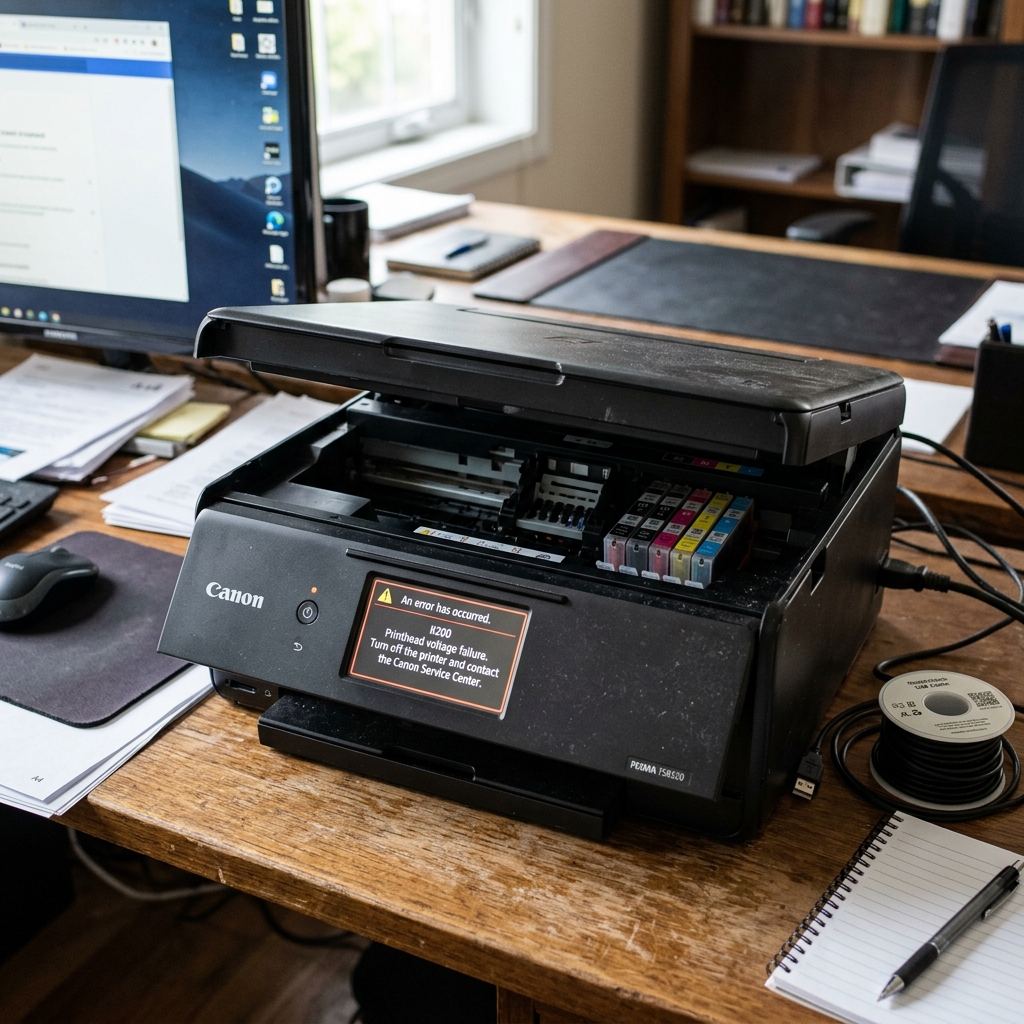
Why B200 is Canon's Most Feared Error
If your Canon PIXMA printer displays Error B200 (or Support Code B200) on its screen, the printer's motherboard has detected a catastrophic electrical anomaly in the printhead assembly. Unlike paper jams or empty ink warnings, B200 is a hardware-level safety shutoff designed to prevent damage to the printer's main logic board.
Canon's internal documentation classifies B200 as a "VH monitor error," meaning the voltage being drawn by the printhead's heating elements is outside the acceptable range. This can happen because the printhead's microscopic resistors have burned out, the electrical contacts are corroded, or a short circuit has occurred due to ink leaking onto the connector pins.
Understanding the Printhead Architecture
Unlike Epson printers that use piezoelectric crystals, Canon PIXMA printers use thermal inkjet technology. Tiny resistors inside each nozzle heat up to over 300°C in microseconds, creating a vapor bubble that forces a droplet of ink onto the paper. There are thousands of these resistors inside a single printhead.
When one or more of these resistors burns out (often from running the printer with an empty cartridge, which forces the resistor to fire without ink to cool it), the electrical resistance of the entire printhead changes. The motherboard detects this abnormal resistance and throws B200 to prevent the remaining resistors from overloading and potentially causing a fire.
Fix 1: The Deep Clean Method
Before buying a new printhead, there is a chance that the B200 error is caused by dried ink bridging two electrical contacts, creating a false short circuit reading.
- Turn the printer off. Open the top cover so the carriage moves to the center.
- Remove every ink cartridge and set them aside on a paper towel.
- Locate the gray plastic locking lever at the front of the carriage. Lift it up.
- Grasp the printhead by its plastic sides (never touch the gold contacts or the nozzle plate on the bottom) and slide it straight up and out of the carriage.
- Fill a shallow dish with 1 cm of warm (not hot) distilled water. Do not use tap water, as the minerals can permanently clog the nozzles.
- Place the printhead nozzle-side down in the dish. Let it soak for 10 to 15 minutes. You will see clouds of ink dissolving into the water.
- Lift the printhead out, and use a lint-free cloth to gently dab the gold electrical contacts on the back of the printhead and the matching gold contacts inside the carriage slot.
- Let the printhead air dry for 30 minutes. Reinstall it, lock the lever, insert the cartridges, and turn the printer on.
Fix 2: The Power Cycle Sequence
Some users have reported success with a specific power cycle sequence that forces the motherboard to re-read the printhead's voltage signature.
- With the printer turned on and the B200 error displayed, open the top cover.
- Wait for the carriage to move to the center.
- While the cover is still open, unplug the power cord from the back of the printer (not from the wall).
- Wait 30 seconds. Plug the cord back in.
- Press the Power button while the cover is still open. The printer will attempt to initialize without running the full printhead voltage check.
- While the printer is initializing, close the top cover.
This sequence works in approximately 30% of cases and is worth trying before purchasing a new printhead.
When Replacement is the Only Option
If the deep clean and power cycle sequence both fail, the printhead's internal resistors are permanently damaged. Canon sells replacement printheads (such as the QY6-0082 for the MG5420 series or QY6-0087 for the MB2020), but they typically cost between $40 and $80.
For budget printers under $100, this often makes replacement uneconomical, and purchasing a new printer may be more cost-effective.
The Truth About Canon Error B200 / Support Code B200 (Voltage Thermal Overload)
Error B200 is the most notorious error in Canon printing. It indicates an Unrecoverable Printhead Voltage / Temperature Overload.
The main logic board detected an excessive current spike or abnormal resistance on the printhead's high-voltage DC lines. In 70% of cases, B200 is caused by an electrical short across internal printhead micro-nozzle circuits, while in 30% of cases, it is caused by a failing Power Supply Board (PSU) delivering unstable line voltage.
Comprehensive 5-Step B200 Recovery & Diagnostic Matrix
- The "Open Lid Power-Up" Bypass Technique:
- Turn the printer completely OFF.
- Open the top access door so the carriage is visible.
- Turn the printer ON.
- Watch the carriage: it will begin moving to the left. Just as the carriage reaches the halfway mark, close the printer lid immediately.
- This timing trick forces the printer to skip the high-voltage printhead diagnostic self-test during boot. If successful, the printer will reach the "Ready" screen, allowing you to run maintenance cycles or scan documents.
- The Alcohol Contact Deep Clean:
Remove the printhead assembly. Inspect the rear copper contacts and the gold carriage spring pins. Ink leakage bridging adjacent voltage pins triggers instant B200 shutdowns. Clean all contacts with 99% anhydrous isopropyl alcohol and allow 1 hour to dry.
- Individual Ink Tank Isolation Test:
Remove all ink cartridges and the printhead. Power on the printer without the printhead. It should display "Install Printhead" (Support Code 1401). If it still shows B200 with the printhead physically removed, the fault is inside the logic board or power supply, not the printhead.
- The Tape Insulating Workaround (Print in Black/Color Only):
If B200 is caused by a short in only one half of the printhead (e.g., the color bank is shorted but pigment black is healthy), technicians use a small piece of Kapton or electrical tape to cover the top-left or top-right bank of copper pins on the back of the printhead, disabling the faulted color nozzles while restoring black document printing.
Frequently Asked Questions
Can a blown power supply cause Error B200?
Yes. If the internal AC/DC power supply module has failing capacitors that sag under load, the logic board interprets the voltage drop as a printhead short and displays B200.
Does replacing the printhead always fix B200?
In roughly 80% of cases where the printer prompts "Install Printhead" when the old head is removed, installing a brand-new genuine Canon printhead completely resolves Error B200.
