


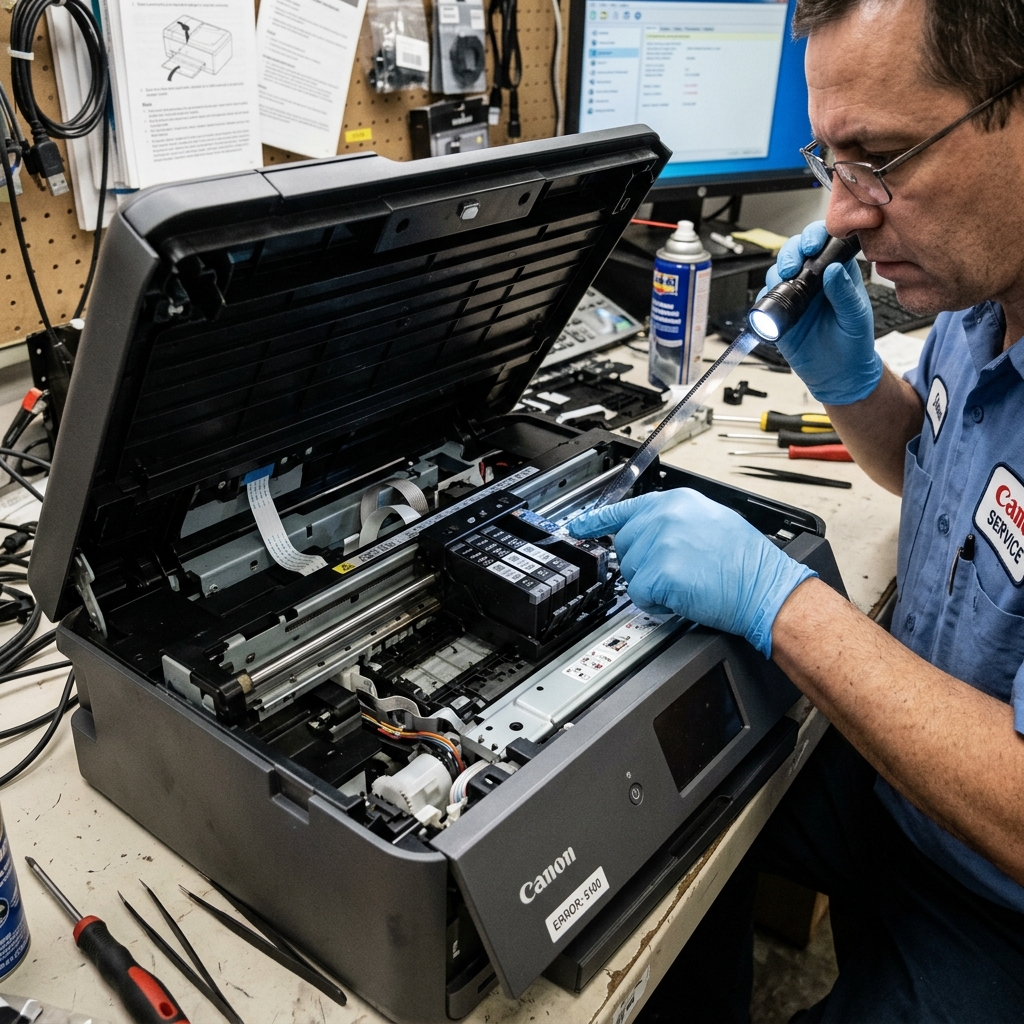
What Triggers Error 5100?
Canon's Support Code 5100 is one of the most common errors across the entire PIXMA range. It indicates that the carriage motor attempted to move the printhead, but encountered excessive resistance or lost its positional tracking.
The printer tracks the carriage's exact position using a thin, clear plastic ribbon called the encoder strip (also called the timing strip). This strip has microscopic vertical lines printed on it.
An optical sensor on the carriage reads these lines to calculate speed and position. If the strip is dirty, cracked, or dislodged, the printer loses track of where the carriage is and immediately halts.
Fix 1: Clearing Physical Obstructions
The most common cause of 5100 is a physical jam. Something is physically preventing the carriage from sliding.
- Turn the printer off and unplug it from the wall.
- Open the top cover to expose the carriage.
- With your hand, gently push the carriage from left to right across the full width of the printer. It should glide smoothly with minimal resistance.
- If it stops at a certain point, shine a flashlight at that exact location. Common culprits include:
- A small piece of crumpled paper wedged under the carriage.
- A paperclip or staple that fell into the printer.
- An ink cartridge that has popped partially out of its slot and is hitting the side wall.
- A piece of packing tape or protective material left inside the printer from the initial unboxing.
- Remove the obstruction with tweezers and test the carriage movement again.
Fix 2: Cleaning the Encoder Strip
If the carriage moves freely but the error persists, the encoder strip is likely dirty.
- With the printer unplugged, look behind the metal carriage rail. You will see a thin, almost invisible, clear plastic strip running horizontally across the full width of the printer.
- Take a clean microfiber cloth and apply a small amount of isopropyl alcohol (90% or higher) to it.
- Gently pinch the encoder strip with the damp cloth and wipe from one end to the other. Do not pull hard or twist the strip; it is held by delicate spring clips.
- You will likely see a gray or black smudge transfer onto the cloth. This is aerosolized ink mist that has settled on the strip over months of printing, blinding the optical sensor.
- Let the strip air dry for 5 minutes before turning the printer back on.
Fix 3: Lubricating the Carriage Rail
If the carriage glides freely when pushed by hand, but the motor still cannot pull it, the factory grease on the metal rail has hardened into a sticky paste.
Wipe the old grease off the top and front surfaces of the metal rail with a paper towel. Apply a very thin line of white lithium grease or sewing machine oil along the rail.
Slide the carriage back and forth manually a dozen times to distribute the lubricant evenly. Never use WD-40, as it evaporates quickly and damages the surrounding plastic components.
Understanding Canon Error 5100 / Support Code 5100 (Carriage Jam Fault)
Error 5100 indicates a Carriage Movement / Positioning Error. During printing, the printhead carriage travels horizontally across the metal guide rail.
The main logic board monitors carriage position via the optical sensor reading the linear encoder strip. If the carriage hits an obstruction, if the drive belt slips, or if grease smudges the encoder strip, Error 5100 halts the machine.
Exhaustive 4-Step Error 5100 Resolution Workflow
- The Flashlight Obstruction Sweep:
Unplug the AC power cord. Open the top cover.
Slide the printhead carriage gently back and forth by hand from the far left to the far right. Use a flashlight to inspect both ends of the track.
Look for torn paper fragments, dropped staples, dislodged packing tape, or curled label backing stuck inside the rail grooves.
- Clean the Linear Optical Encoder Strip:
Behind the carriage is the thin, clear plastic encoder timing strip. Grease from the carriage rail or aerosolized ink mist frequently smudges this strip, blinding the optical reader.
Moisten a clean microfiber cloth with warm distilled water. Gently pinch the strip between your fingers and wipe from left to right. (Never use alcohol, which dissolves the timing marks).
- Inspect the Carriage Drive Belt & Tensioner:
Inspect the black toothed rubber drive belt running along the back of the carriage rail. Ensure the belt is taut, properly seated in the motor cog on the left, and has not jumped off the idler pulley on the right.
- Lubricate the Steel Guide Rail:
Wipe old, gritty ink grease off the silver metal carriage guide rod using a dry cloth. Apply 2-3 drops of synthetic silicone lubricant (or sewing machine oil) along the top of the rod to ensure frictionless glide.
Frequently Asked Questions
Why does Error 5100 only occur when the carriage reaches the far right side?
If 5100 occurs specifically on the right side, the purge maintenance station is failing to engage or the carriage lock lever is sticking. Clean the purge unit capping station.
Can a dislodged ink tank trigger Error 5100?
Yes. If an individual ink cartridge or MegaTank printhead latch is popped up by even 2mm, it will physically catch on the top chassis frame as the carriage moves, tripping 5100.
