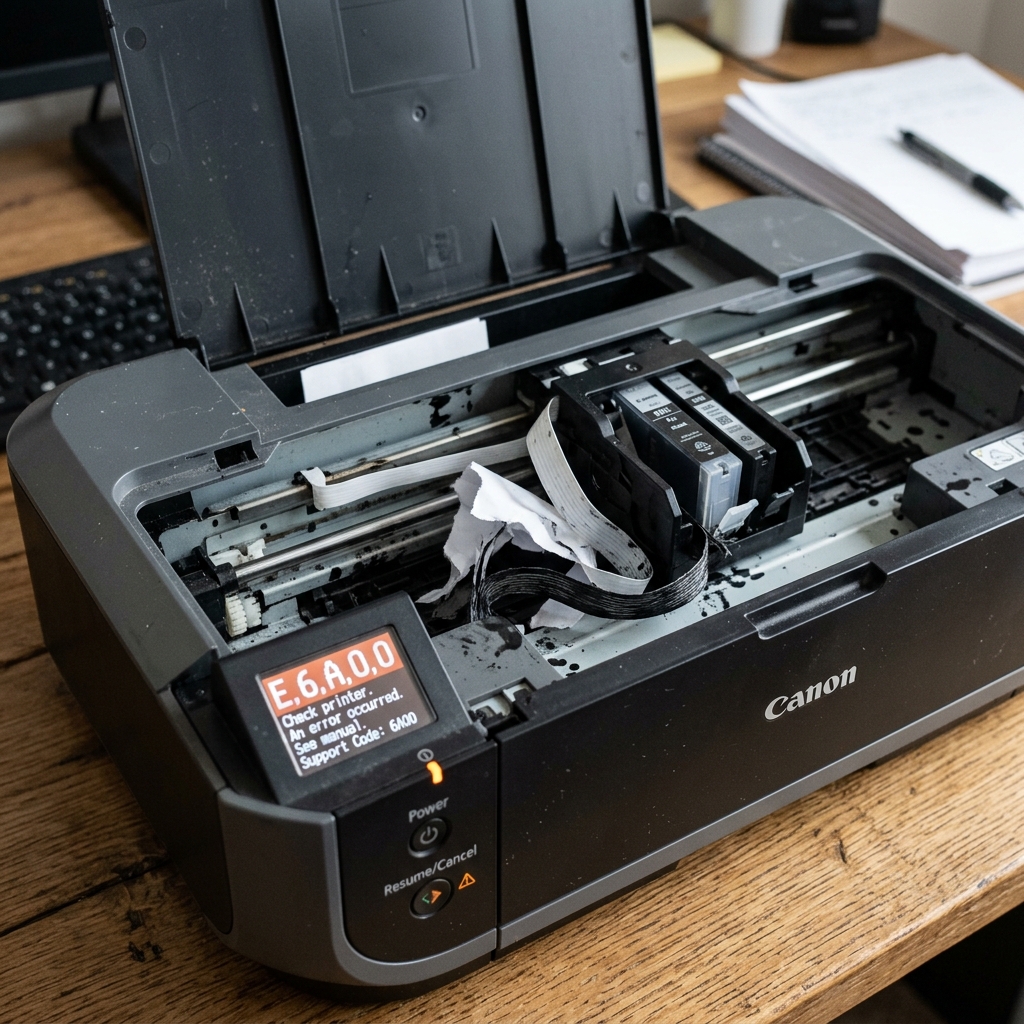
What is Error 6A00?
Canon's error 6A00 is distinct from the more common 5100 carriage jam. While 5100 means the carriage motor is struggling to move the printhead left and right across the page, 6A00 specifically targets the purge unit (also called the ink absorber cap station or service station).
The purge unit is the small mechanical assembly on the far right side of the printer where the printhead "parks" when not in use. It consists of small rubber suction cups, a vacuum pump, and tubing that connects to the waste ink pad.
Its job is to cap the printhead nozzles to prevent them from drying out, and to periodically suction-clean clogged nozzles by pulling ink through them with negative pressure.
Why the Purge Unit Jams
Over time, waste ink passes through the purge unit's tubing and accumulates in and around the rubber caps. This dried ink creates a sticky, gummy residue that can physically jam the purge unit's vertical movement (it needs to lift up to cap the printhead and drop down when the carriage needs to move).
If the purge unit is stuck in the "up" position, the carriage crashes into it when trying to park, triggering 6A00.
Fix 1: Manual Release of the Purge Unit
- Turn the printer off and unplug it.
- Open the top cover. The carriage may be stuck against the right wall. Gently push it to the center to expose the purge unit.
- Look at the far right corner. You will see a small platform with rubber caps (usually white or dark gray) and some plastic tubing.
- Take a cotton swab or a wooden toothpick and gently press down on the rubber cap platform. It should move downward smoothly. If it resists, dried ink is gluing it in place.
- Apply a few drops of warm water or isopropyl alcohol around the base of the purge unit to dissolve the dried ink. Wait 5 minutes, then try pressing it down again.
Fix 2: Cleaning the Rubber Caps
If the purge unit moves freely but the error persists, the rubber capping pads themselves may be coated in dried ink so thick that they are physically taller than designed, causing the carriage to hit them.
- Dampen a cotton swab with warm water.
- Gently clean the top surface of each rubber cap. You will see thick, crusty ink dissolving away.
- Dry the caps with a lint-free cloth.
Fix 3: The Gear Train
The purge unit is driven by a small set of plastic gears. If one of these gears has cracked or lost a tooth, the motor cannot lift or lower the purge unit.
This requires partial disassembly of the printer's right side panel to inspect the gear train—a task best left to experienced users or repair shops.
Understanding Canon Error 6A00 / Support Code 6A00 (Purge Unit Jam)
Error 6A00 indicates an Automatic Purge Unit / Maintenance Station Malfunction. The purge station (located on the far right side where the printhead parks) houses the rubber capping seal, wiper blades, and a cam-driven suction pump.
When dried, congealed ink sludge accumulates in the purge unit track, the wiper blade binds, preventing the station from locking or unlocking the printhead carriage and generating Error 6A00.
Step-by-Step Diagnostic & Cleaning Procedure
- Inspect the Purge Station & Wiper Blade:
Unplug the printer and open the top access cover. Move the printhead carriage to the center.
Look into the far right cavity with a flashlight. You will see a small, flexible clear rubber wiper blade.
If dried ink crust is binding the blade or if the rubber cap is skewed, clean the wiper blade and capping tracks with warm distilled water on a cotton swab.
- Manually Cycle the Purge Unit Drive Gear:
On the far left of the printer chassis sits a white plastic drive cog. Turn this gear clockwise with your fingertip. You should observe the purge unit mechanism on the right rise and lower smoothly. Continue turning until the wiper blade completes one full forward-and-back sweep.
- Clear the Paper Jam Chute Near the Purge Station:
Small scraps of torn paper frequently get pulled into the right-side suction cap area. Remove any paper fragments with tweezers.
- Execute a Full Power Reset:
Leave the printer disconnected from AC power for 10 minutes. Hold down the Power button for 20 seconds while unplugged to clear the purge motor stall flag.
Frequently Asked Questions
Why does Error 6A00 occur during initial power on?
During bootup, the printer cycles the purge unit to test the wiper motor home sensor. If the purge unit does not complete its cycle within 3 seconds, Error 6A00 is tripped immediately.
Can I lubricate the purge unit gears?
Apply only 1-2 drops of synthetic silicone lubricant to the plastic cam slider tracks. Never use WD-40 or grease that can mix with ink into an abrasive paste.